ESP32で10KHz AC波 IQ同期検波方式で降雨センサーを作る
降雨センサーに加える高周波の最適な周波数に関して
降雨センサー(特に電極間の水の導電率や誘電率変化を捉える方式)にAC波を流して検波する場合、電解コンデンサ作用(分極)による誤差を防ぎ、かつ水滴の検出感度を最大化するという観点から、最適な周波数は 10kHz〜20kHz周辺が、水の導電率(イオンによる電流)と静電容量(誘電特性)の変化をバランスよく捉えやすく、かつ安定した検波が可能と言われています。
同期検波方式の仕組み
ESP32で出来るだけ外部部品を使わない形で降雨センサーを作りたい場合、ESO32が自分で
AC波を発振し、その信号を雨センサーを経由して自身のADコンバーターでAC波の振幅を読めれば
可能である。
その場合に最もスマートで検知精度が高い方式が同期検波方式という事になる。
同期検波が最適な理由
・抜群のノイズ耐性: 降雨センサーは屋外に設置されるため、商用電源ノイズ(50/60Hz)や外来
ノイズの影響を受けやすいですが、同期検波なら送信したAC信号の周波数成分のみを正確に抽出
できます。
・ダイオード検波の弱点を克服: 通常のダイオードによる整流検波(包絡線検波)では、ダイオード
の順方向電圧降下(約0.6V)以下の微小な変化を捉えられませんが、同期検波はこの制約がありま
せん。
調べて見るとこのようなノイズに埋もれた微少な交流信号を検出する技術として「ロックインア
ンプ」という方法があるようだ。
web上では「東陽テクニカ」さんのホームページに詳細記事があるので参考にさせてもらった。
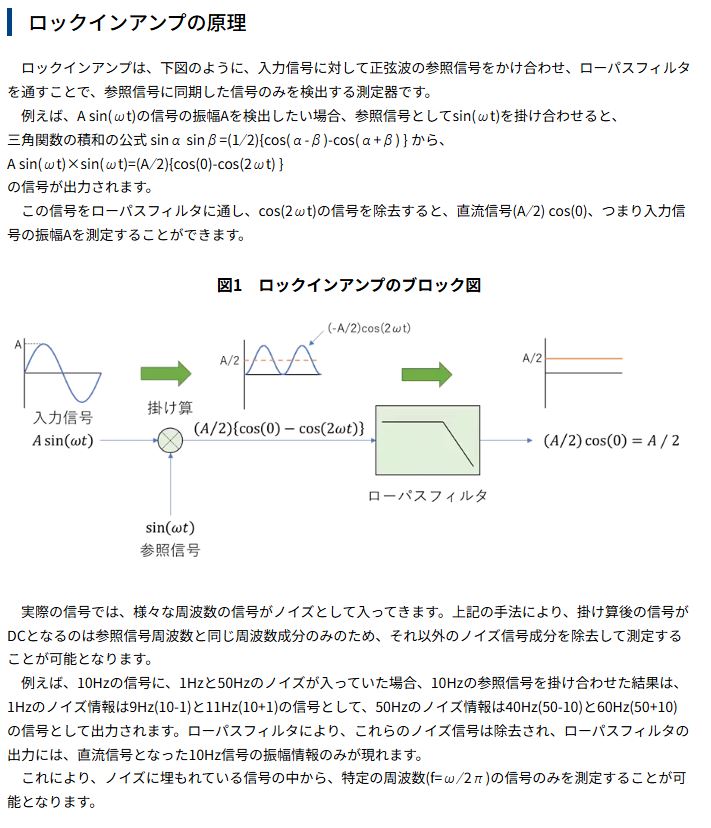
数式での説明があるので分かりやすい。
ESP32上でのソフトウェア同期検波の動作概要
アナログ回路で行っていた「信号の掛け算」と「平滑化(積分)」を、ESP32内部のプログラム(数学
演算)で処理します。
1、基準信号(参照波)の用意: プログラム内で 10kHz のデジタルサイン波(または矩形波)を基準信
号 として用意します。
2、受信信号のサンプリング: センサーからの応答波形をADCで高速に読み込みます。
3、デジタル復調(掛け算): ADCで取得した実データと基準信号をCPU内で掛け合わせます。
4、デジタルフィルタ(平滑化): 掛け算した結果に対し、移動平均などのデジタルローパスフィルタ(LPF)を適用し、直流(DC)成分として抽出します。
ESP32で処理するにあたり、いくら高性能といっても10KHzに対しての処理はかなり重い作業となる
(すべての作業をESP32で行うとクラッシュしてしまう)。
まずは、テスト回路でテストしシリアルモニター上にデーターを表示してみます。
動作原理
・晴れているとき(雨センサーに水がないとき):
センサーの抵抗値はほぼ無限大です。そのため、IO25から抵抗を通ってきた10kHzのAC信号は、
雨センサーを経由してから増幅され約3V程度の振幅でIO32に入力されます。
・雨が降ったとき(センサーに水滴がついたとき):
センサーの抵抗値が低下(GNDへの逃げ道ができる)します。すると、10kΩの基準抵抗とセンサー
の抵抗値とで電圧が分圧され、IO32に入力される10kHzの振幅が小さくなります。
本チャンの前段階としてテストスクリプトを作り、センサーが雨滴を認識し、かつAC波が雨滴
量に比例して振幅を変化させかつ、それを正確に捉えられるかを試験する。
同期検波式雨センサー実験回路図
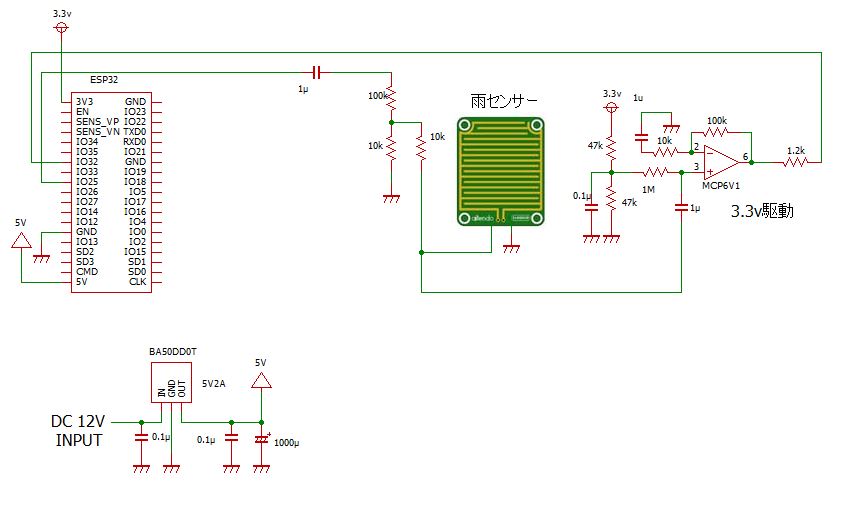
ESP32のDACからの出力インピーダンスは、(約3kΩ)高いので負荷をかけないように取り出してから雨
センサにコンデンサー経由でAC電流で流している、無理をすると波形が歪む為の対策である。
雨滴による雨センサーの表面抵抗値の微少変化を取り出し、ESP32内蔵のADCで扱えるよう1..65V
のDCバイアス中心にx10倍程度増幅してから内蔵ADCに入力している。
実験用スクリプト DAC 8ステップ版(タイマー割り込みを使用)
ESP32 Arduino Core v2.0.17 用 2.5KHzの例
#include <Arduino.h>
#include <driver/adc.h>
#include <driver/dac.h>

// =========================
// ピン
// =========================
#define ADC_CH ADC1_CHANNEL_4

// =========================
// タイマー
// =========================
hw_timer_t *timer = NULL;

// =========================
// 波形(8ステップ)※理論値
// =========================
const uint8_t dac_wave[8] = {
  128, 218, 255, 218, 128, 38, 0, 38
};

// 同期検波用サイン(スケール±127)
const int8_t ref_wave[8] = {
  0, 90, 127, 90, 0, -90, -127, -90
};

// =========================
// ISR共有
// =========================
volatile int step = 0;
volatile int32_t acc = 0;
volatile int32_t cnt = 0;

// オフセットは整数で管理(高速化)
volatile int32_t offset = 2048;

// =========================
// ISR
// =========================
void IRAM_ATTR onTimer() {

  // DAC出力
  dac_output_voltage(DAC_CHANNEL_1, dac_wave[step]);

  // ADC取得
  int raw = adc1_get_raw(ADC_CH);

  // オフセット追従(IIRフィルタ)
  offset = (offset * 999 + raw) / 1000;

  int ac = raw - offset;

  // 同期検波(サイン乗算)
  acc += ac * ref_wave[step];

  cnt++;

  step++;
  if (step >= 8) step = 0;
}

// =========================
// タイマー初期化 40KHz
// =========================
void setupTimer() {
  timer = timerBegin(0,80,true);
  timerAttachInterrupt(timer, &onTimer,true);
  timerAlarmWrite(timer, 25, true);
  timerAlarmEnable(timer);
}

// =========================
// 振幅取得
// =========================
float readAmplitude() {
  int32_t a, c;

  noInterrupts();
  a = acc;
  c = cnt;
  acc = 0;
  cnt = 0;
  interrupts();

  if (c == 0) return 0;

  // スケーリング(サイン対応)
  return fabs((float)a / c) * (2.0f / 127.0f);
}

// =========================
// setup
// =========================
void setup() {
  Serial.begin(115200);

  adc1_config_width(ADC_WIDTH_BIT_12);
  adc1_config_channel_atten(ADC_CH, ADC_ATTEN_DB_11);

  dac_output_enable(DAC_CHANNEL_1);

  setupTimer();
}

// =========================
// loop
// =========================
void loop() {
  delay(500);

  float val = readAmplitude();

  Serial.print("Rain_Intensity: ");
  Serial.println(val, 6);
}実行結果
Rain_Intensity: 1982.601685
Rain_Intensity: 1982.849731
Rain_Intensity: 1982.652588
Rain_Intensity: 1983.056763
Rain_Intensity: 1983.087524
Rain_Intensity: 1982.984131
Rain_Intensity: 1982.310303
Rain_Intensity: 1982.822998
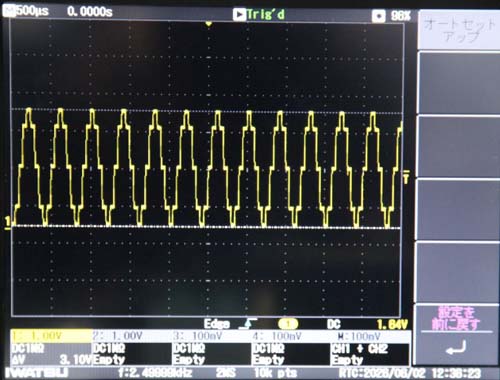
実際の波形画像(ADCの入力波形 降雨無し時)
スクリプトの概要説明
・同期検波の部分の説明
// =========================
// 波形(8ステップ)※理論値
// =========================
const uint8_t dac_wave[8] = {
128, 218, 255, 218, 128, 38, 0, 38
};
// 同期検波用サイン(スケール±127)
const int8_t ref_wave[8] = {
0, 90, 127, 90, 0, -90, -127, -90
};
同期検波では、「自分が送信した波(DAC出力)」と、「検波に使う参照波」のタイミングを完全に同
期させる必要があります。
簡単に説明する為に4ステップの例をあげます。
const uint8_t dac_wave[4] = {128, 255, 128, 0};
const int8_t ref_wave[4] = {1, 1, -1, -1};
の例の場合
リストの4つの要素は、1周期 360°を4等分した 0°, 90°, 180°, 270° の瞬間における信号の状態 を表
しています。
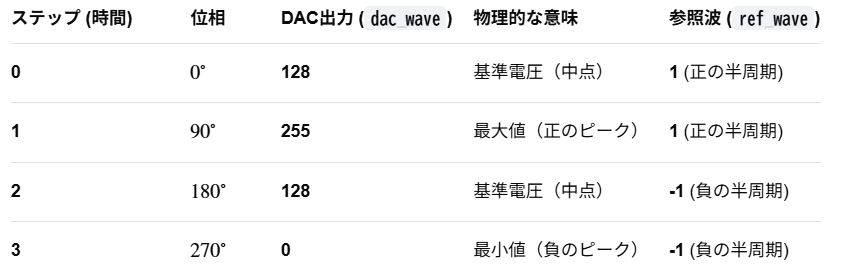
なぜこの数値(128, 255, 128, 0)なのか?
ESP32のDACは「0〜255」の8ビット値しか出力できません。負の電圧(マイナス)を出力できないため、直流(DC)のオフセットを加えて常に正の電圧にする必要があります。
・128 が信号の「ゼロ点(中心)」です。
・中心から上に +127 振れたのが 255 です。(正のピーク)
・中心から下に -128 振れたのが 0 です。(負のピーク)
つまり、交流成分(AC)だけで見ると、送信波は 0, +127, 0, -128 という変化をしています。
ref_wave の 1 と -1 の意味
同期検波(ロックイン検波)の原理は、「入力された信号に、送信時と同じ位相のときは +1を掛け、逆位相のときは -1を掛けて足し合わせる(積分する)」ことです。
・前半(0°~180°): 送信波が中点から上に振れている区間なので、参照波は 1
・後半(180°~360°): 送信波が中点から下に振れている区間なので、参照波は -1
この 「前半か後半か」を判定して掛け算するために、ref_wave のリストが存在します。
サンプリングが4とか8とか16と少なくても機能する理由について
厳密な意味ではこれは 正弦波(サイン波)ではなく、かなり歪んだ波形 です。4ステップのサンプリング(標本化)では、階段状の「疑似的な波」になります。
しかし、同期検波の用途においては、実用上これで問題ない(正弦波として機能する)場合が多いです。
1、 なぜ「矩形波」のようでも問題ないのか?
同期検波(ロックイン検波)の最も重要な役割は、「特定の周波数の信号(基本波)だけを抜き出すこと」です。
数学的(フーリエ級数展開)に見ると、どんなに歪んだ波形でも、その中には「きれいな正弦波(基本波)」が含まれています。
・送信波 (dac_wave): 128, 255, 128, 0
・参照波 (ref_wave): 1, 1, -1, -1 (これは完全な矩形波です)
この2つを組み合わせて同期検波を行うと、信号に含まれる基本波成分に対してのみ検波(直流への変換)が行われます。
波形がカクカクしていても、フィルタ(LPF)を通すことで高周波のトゲ(高調波)が削ぎ落とされるため、結果的に「正弦波を送受信して検波した」のと同じ結果が得られます。
2、階段状の波がもたらす影響(メリット・デメリット)
メリット
・処理が極めて高速・軽量
ESP32のタイマー割り込み内で、わずか4ステップのテーブルを参照するだけなので、CPUに負荷をかけずに高い周波数の検波が行えます。
・計算が簡単
参照波が 1 と -1 のみであるため、乗算(掛け算)ではなく、単なる加算(足し算)と減算(引き算)だけで検波処理が完結します。
デメリット
・高調波(ノイズ)の影響を受けやすい
矩形波に近い波形を使っているため、基本波の3倍、5倍といった「奇数次の高調波」のノイズが近くにあると、それも一緒に検波してしまう弱点があります。
・波形の見た目が悪い
オシロスコープで観察すると正弦波には見えず、ノコギリ波や矩形波に近い歪んだ波形として観測されます。
「きれいな正弦波」にしたい場合は?
もしセンサーの特性上、歪んだ波形では誤動作する場合や、検波精度をさらに高めたい場合は、以下の対策をとります。
・ルックアップテーブルのステップ数を増やす
ステップ数を16や32に増やすと、DACの出力は滑らかな正弦波に近づきます。
・ハードウェアでフィルタ(RCローパスフィルタ)を通す
ESP32のDAC出力ピンの直後に抵抗とコンデンサ(RCフィルタ)を接続すると、階段状のトゲが滑らかになり、きれいな正弦波に変化します。
「時間軸」からの度数変換について
const uint8_t dac_wave[8] = {128,218,255,218,128,38,0,38};
「そのデータが1周期の何番目のステップか」 から度数を求める場合の式

今回の8ステップのテーブル(要素数8)に当てはめると、1ステップあたり 45°(360/8)ずつ進むことになります。
・理論値(理想的な正弦波)の計算
DACで8ステップで 45°ごとに正確な正弦波を作る場合、計算式は以下のようになります。
V(0°) = 128 + 0 x sin(0°) =128
V (45°) = 128 + 127 x sin(45°) =128 + 127 x 0.7070 = 128 + 89.8 = 217.8 ≒218
V (90°) = 128 + 127 x sin(90°) =128 + 127 x 1 = 255
V (135°) = 128 + 127 x sin(135°) =128 + 127 x 0.7070 = 128 + 89.8 = 217.8 ≒218
V (180°) = 128 + 127 x sin(180°) =128 + 127 x 0= 128
V (225°)= 128 + 127 x sin(225°) =128 + 127 x (-0.7070) =128 – 89.8 = 38.2 ≒38
V (270°)= 128 + 127 x sin(270°) =128 + 127 x (-1)= 128 – 127 = 1
V (315°)= 128 + 127 x sin(45°) =128 + 127 x (-0.7070) =128 – 89.8 = 38.2 ≒38
270°のみ理論値が1なのにスクリプト上は0にしてある理由について
ESP32のDACは8bitなので:分解能:0〜255(256段階)
1と0の差はたった1LSBこれは実質:約0.4%の誤差ほぼ誤差レベル
0にする目的は->テーブルを「対称」にしたい
{128,218,255,218,128,38,0,38}は対称
{128,218,255,218,128,38,1,38}は正しいが非対称
ESP32 DACは:0付近はノイズが多い、オフセット誤差が乗りやすい->むしろ0に潰した方が安定することがある
非対称にした方がノイズ・バラつきに強い
対応させる同期検波用サイン波について
// 同期検波用サイン(スケール±127)
const int8_t ref_wave[8] = { 0, 90, 127, 90, 0, -90, -127, -90};
DACの場合のかさ増し分128が無くなるので
S(0°) = 0 x sin(0°) =0
S(45°) = 127 x sin(45°) =127 x 0.7070 = 89.8 ≒90
S(90°) = 127 x sin(90°) =127 x 1 = 127
S(135°) = 127 x sin(135°) =127 x 0.7070 = 89.8 ≒90
S(180°) = 127 x sin(180°) =127 x 0= 0
S(225°)= 127 x sin(225°) =127 x (-0.7070) =- 89.8 ≒-90
S(270°)= 127 x sin(270°) =127 x (-1)= – 127
S(315°)= 127 x sin(45°) =127 x (-0.7070) =- 89.8 ≒-90
タイマー割り込み設定に関して
// ===========
// タイマー初期化
// ===========
void setupTimer() {
timer = timerBegin(0,80,true);
timerAttachInterrupt(timer, &onTimer,true);
timerAlarmWrite(timer, 50, true);
timerAlarmEnable(timer);
}
(上記はCor2.0.17での書き方でCor3.xでは書式が変わるので注意)
計算の仕組み
ESP32のベースクロックは 80MHz (80,000,000Hz) 固定です。
timerBegin(0, 80, true); ->80を 80,000,000 で割る(分周する)設定になっています。
計算: 80 / 80,000,000 = 1/1,000,000sつまり、タイマーが「1」カウント進むのに1us
かかります。
timerAlarmWrite(timer, 50, true);「50カウント進んだら割り込む」という設定です。
1カウント進む時間が1μsなので、割り込みは 50μs周期(20kHz)で発生してしまいます。
このタイマー割り込み20KHzで16ポイントの場合のサイン波の周波数は1.25KHzになります。
計算式:20KHz ÷ 16ポイント = 1.25KHz
・同期検波のローパスフィルター(移動平均フィルタ)について
// =========================
// 振幅取得
// =========================
float readAmplitude() {
int32_t a, c;noInterrupts();
a = acc;
c = cnt;
acc = 0;
cnt = 0;
interrupts();
if (c == 0) return 0;
return fabs((float)a / c) * (2.0f / 127.0f);
}
同期検波におけるローパスフィルタ(LPF)の目的は、「検波(掛け算)によって発生した高い周波数のノイズを取り除き、直流(DC)成分だけを取り出すこと」です。
なぜこの計算がローパスフィルタになるのか?
プログラム内の計算式は、一定期間のデータの「平均値(移動平均)」を求めています。

信号処理の世界において、「平均化」は最もシンプルかつ強力なローパスフィルタ(移動平均フィルタ:Moving Average Filter)として機能します。
計算の仕組みとフィルタ効果
1、加算
タイマー割り込みごとに、入力信号と参照波を掛け合わせた値(プラスの値とマイナスの値)をどんどん足し合わせます。
2、除算
一定時間(例えば100回や1000回)の平均を計算します。
3、ノイズの相殺
ノイズや高い周波数の信号(AC成分)は、プラス側とマイナス側に激しく変動するため、平均化されることでゼロに向かって打ち消し合います。
4、信号の抽出
目的の周波数(同期している成分)だけは、掛け算によって常にプラス(または常にマイナス)の直流(DC)に変換されているため、平均化しても消えずに残り、振幅として抽出されます。
スクリプト最後のreturn fabs((float)a / c) * 2.0;の意味
送信波と受信波の間に位相のズレがあると、平均値(result)がマイナスの値になることがあります。abs(result) で絶対値をとることで、位相が反転していても正しく 「信号の大きさ(振幅)」 として取り出すことができます。
return fabs((float)a / c) * (2.0f / 127.0f);
2倍しているのは、最初の「東陽テクニカ」さんの原理図の数式参照(出力振幅A=(A/2) x 2)。
127.0fで割っているのはサイン値-1~1にスケールを戻している。
・高速にサンプリングしたいのでanalogRead()より高速・安定なadc1_get_raw()を使う
adc_val = adc1_get_raw(ADC1_CHANNEL_4);
・高速にサンプリングしたいのでanalogRead()より高速・安定なadc1_get_raw()を使う
adc_val = adc1_get_raw(ADC1_CHANNEL_4);
ここで参考にESP32 DACによる基本的なsin波の発生方法について解説
50Hzの場合
#include <Arduino.h>
#include <math.h>

const int dacPin = 26; // DAC2
const int numSamples = 100; // 1周期のサンプル数
byte sineTable[numSamples];

void setup() {
  // サイン波テーブルの生成 (0~255)
  for (int i = 0; i < numSamples; i++) {
    sineTable[i] = (byte)(sin(2 * PI * i / numSamples) * 127 + 128);
  }
}

void loop() {
  // サイン波を出力
  for (int i = 0; i < numSamples; i++) {
    dacWrite(dacPin, sineTable[i]);
    delayMicroseconds(200); // 周波数を調整 (50Hzの場合: 100samples * 200us =20ms周期)
  }
}1周期を100等分した先頭からi番目のsinの値は sin(2π x i/100)ですから
sin(2 * PI * i / numSamples) で-1~1迄変化する関数になります。
マイナスの信号はそのまま出力出来ませんので-1から1迄の値を変換して1-255の値にします。
それが *127 + 128 の部分の処理になります。
まず-1から1の値に127を乗算すると -127~+127に変換されます。
まだマイナスなので今度は128を足します。
そうすると1~255に変換されます。
今回のテストスクリプト上ではサイン波テーブルは計算では無く数値テーブルで用意する形です。
参考用にESP32 Arduino Core v2.0.17 のタイマー割り込みのやり方解説
コードサンプル Core 3.xと書き方が違うので注意すること
#include <Arduino.h>

hw_timer_t *timer = NULL;
volatile bool isrTriggered = false;

// 割り込みサービスルーチン (ISR)
void IRAM_ATTR onTimer() {
  isrTriggered = true;
}

void setup() {
  Serial.begin(115200);

  // タイマーの初期化: 1MHz (1us) の分解能で設定
  timer = timerBegin(0,1000000,true);

  // タイマーの関数を割り当て
  timerAttachInterrupt(timer, &onTimer,true);

  // タイマーの間隔と動作設定: 1秒 (1,000,000 us) ごとに繰り返し
  timerAlarmWrite(timer, 1000000, true); // trueは自動リロード
  timerAlarmEnable(timer);
}

void loop() {
  if (isrTriggered) {
    Serial.println("Timer interrupt!");
    isrTriggered = false;
  }
}
参考にESP32 Arduino Core v2.0.17 の ADコンバーターの使い方解説
1. 基本的なADCの仕様
・解像度: 最大12ビット(0〜4095)。
・入力電圧範囲: 0V 〜 3.3V (デフォルト設定の場合)。
・使用可能ピン: ADC1 (GPIO 32-39) および ADC2 (GPIO 0, 2, 4, 12-15, 25-27)。
注意: Wi-Fi使用時はADC2は使用不可。
2. analogRead() の使い方
最もシンプルな方法で内部で自動的に減衰器(アッテネータ)が設定されます。
コードサンプル
const int adcPin = 34; // ADC1のピンを選択
int adcValue = 0;

void setup() {
  Serial.begin(115200);
  // analogReadResolution(12); // 分解能設定 (デフォルト12bit)
}

void loop() {
  adcValue = analogRead(adcPin);
  Serial.println(adcValue);
  delay(100);
}
3. 高精度な電圧取得 (Calibrated ADC)
ESP32のADCは個体差があり、そのままでは誤差が大きいため、キャリブレーション(校正)機能を利用してmv(ミリボルト)単位で取得します。
コードサンプル
#include "esp_adc_cal.h"

esp_adc_cal_characteristics_t *adc_chars;
const adc_channel_t channel = ADC_CHANNEL_6; // GPIO34
const adc_atten_t atten = ADC_ATTEN_DB_11;   // 0-3.3V範囲
const adc_unit_t unit = ADC_UNIT_1;

void setup() {
  Serial.begin(115200);

  // キャリブレーション設定
  adc_chars = (esp_adc_cal_characteristics_t*)calloc(1, sizeof(esp_adc_cal_characteristics_t));
  esp_adc_cal_characterize(unit, atten, ADC_WIDTH_BIT_12, 1100, adc_chars);

  // ピン設定
  adc1_config_width(ADC_WIDTH_BIT_12);
  adc1_config_channel_atten(channel, atten);
}

void loop() {
  uint32_t adc_raw;
  adc_raw = adc1_get_raw(channel);

  // mVに変換
  uint32_t mv = esp_adc_cal_raw_to_voltage(adc_raw, adc_chars);

  Serial.printf("Raw: %d\tVoltage: %dmV\n", adc_raw, mv);
  delay(100);
}
精度を上げるためのコツ (ノイズ対策)
・コンデンサの追加: ADピンとGNDの間に0.1μF(100nF)〜10μFのコンデンサを接続するとノイズが
減ります。
・減衰器(Atten)の選択: 測定する電圧範囲に合わせて設定します。0〜3.3Vを測る場合は
ADC_ATTEN_DB_11 を使用します
精度を上げる意味では「Calibrated ADC」は必須ですが、今回のようなギリギリのタイミングでの採用ではそれによる害の方が心配されますのでこの機能は使わない処理を採用します。
より高精度な実験用スクリプトDAC16ステップ版
ESP32 Arduino Core v2.0.17 用 1.25KHzの例
#include <Arduino.h>
#include <driver/adc.h>
#include <driver/dac.h>

// =========================
// ピン
// =========================
#define ADC_CH ADC1_CHANNEL_4

// =========================
// タイマー
// =========================
hw_timer_t *timer = NULL;

// =========================
// 波形(16ステップ)
// =========================
const uint8_t dac_wave[16] = {
  128, 176, 218, 245, 255, 245, 218, 176,
  128,  80,  38,  11,   1,  11,  38,  80
};

// 同期検波用(sin)スケール±127
const int8_t ref_wave[16] = {
    0,  49,  90, 117, 127, 117,  90,  49,
    0, -49, -90,-117,-127,-117, -90, -49
};

// =========================
// ISR共有
// =========================
volatile int step = 0;
volatile int32_t acc = 0;
volatile int32_t cnt = 0;
volatile int32_t offset = 2048;

// =========================
// ISR
// =========================
void IRAM_ATTR onTimer() {

  dac_output_voltage(DAC_CHANNEL_1, dac_wave[step]);

  int raw = adc1_get_raw(ADC_CH);

  // オフセット除去(IIR)
  offset = (offset * 999 + raw) / 1000;
  int ac = raw - offset;

  // 同期検波
  acc += ac * ref_wave[step];

  cnt++;

  step++;
  if (step >= 16) step = 0;
}

// =========================
// タイマー初期化 20KHz
// =========================
void setupTimer() {
  timer = timerBegin(0,80,true);
  timerAttachInterrupt(timer, &onTimer,true);
  timerAlarmWrite(timer, 50, true);
  timerAlarmEnable(timer);
}

// =========================
// 振幅取得
// =========================
float readAmplitude() {
  int32_t a, c;

  noInterrupts();
  a = acc;
  c = cnt;
  acc = 0;
  cnt = 0;
  interrupts();

  if (c == 0) return 0;

  // サイン同期用スケーリング
  return fabs((float)a / c) * (2.0f / 127.0f);
}

// =========================
// setup
// =========================
void setup() {
  Serial.begin(115200);

  adc1_config_width(ADC_WIDTH_BIT_12);
  adc1_config_channel_atten(ADC_CH, ADC_ATTEN_DB_11);

  dac_output_enable(DAC_CHANNEL_1);

  setupTimer();
}

// =========================
// loop
// =========================
void loop() {
  delay(500);

  float val = readAmplitude();

  Serial.print("Rain_Intensity: ");
  Serial.println(val, 6);
}実行結果
Rain_Intensity: 1979.246216
Rain_Intensity: 1979.238159
Rain_Intensity: 1979.458862
Rain_Intensity: 1979.464844
Rain_Intensity: 1979.397095
Rain_Intensity: 1979.361938
Rain_Intensity: 1979.322632
Rain_Intensity: 1979.073242
Rain_Intensity: 1979.323608
Rain_Intensity: 1978.989624
実際の波形画像(ADCの入力波形 降雨無し時)
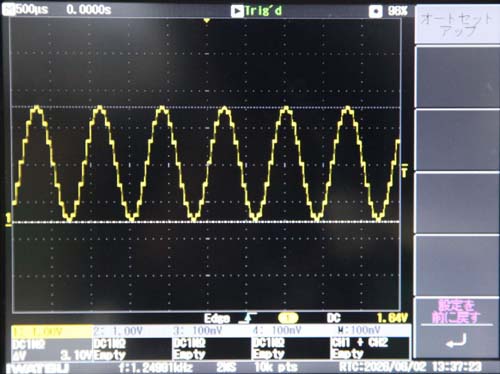
安定動作の方を選択
サイン波をDACで発振させて検波させるという流れは自然で理想なのですが、現実はなかなか上手く
行きません。
数十回試作、実験を重ねて見ると現状最終的にDAC でPWM発振 (矩形波)させた方が一番同期が
外れ難く安定して動作している感じでした。
実験用16ポイントPWM波同期検波スクリプト 10KHz
PWM波発振はハードウエアで処理します、タイマー割り込みを使ってADC同期検波を行います。
実験の回路を組んだうえで下記のスクリプトを実行すると雨センサーを経由したサイン波の振幅が
Serial Printで表示されます。
#include <Arduino.h>
#include <driver/adc.h>
// #include <driver/dac.h> // 不要になったためコメントアウト

// =========================
// ピン
// =========================
#define ADC_CH ADC1_CHANNEL_4
#define PWM_PIN     25             // 【追加】GPIO25をPWM出力に指定

// =========================
// タイマー
// =========================
hw_timer_t *timer = NULL;

// =========================
// 波形(16ステップ)
// =========================
// 元の dac_wave[16] は不要になったため削除しました

// 同期検波用(sin)スケール±127
const int8_t ref_wave[16] = {
    0,  49,  90, 117, 127, 117,  90,  49,
    0, -49, -90,-117,-127,-117, -90, -49
};

// =========================
// ISR共有
// =========================
volatile int step = 0;
volatile int32_t acc = 0;
volatile int32_t cnt = 0;
volatile int32_t offset = 2048;

// =========================
// ISR
// =========================
void IRAM_ATTR onTimer() {

  // 【変更】DAC出力処理を削除し、純粋なADC同期サンプリングと検波のみにします
  int raw = adc1_get_raw(ADC_CH);

  // オフセット除去(IIR)
  offset = (offset * 999 + raw) / 1000;
  int ac = raw - offset;

  // 同期検波(バックグラウンドで出力されている10kHz信号とステップを合わせて演算)
  acc += ac * ref_wave[step];

  cnt++;

  step++;
  if (step >= 16) step = 0;
}

// =========================
// タイマー初期化
// =========================
void setupTimer() {
  // 80MHz / 50 = 1.6MHz (0.625μsステップ)
  // 1.6MHz / 10 = 160kHz (6.25μs周期 = 10kHz×16ステップに完全一致)
  timer = timerBegin(0, 5, true);      // 【修正】分周比を80から5に変更しクロック元を高精度化
  timerAttachInterrupt(timer, &onTimer, true);
  timerAlarmWrite(timer, 100, true);   // 【修正】100カウント(6.25μs)毎に割り込み(160kHzサンプリング)
  timerAlarmEnable(timer);
}

// =========================
// 振幅取得
// =========================
float readAmplitude() {
  int32_t a, c;

  noInterrupts();
  a = acc;
  c = cnt;
  acc = 0;
  cnt = 0;
  interrupts();

  if (c == 0) return 0;

  // サイン同期用スケーリング(元の計算式を維持)
  return fabs((float)a / c) * (2.0f / 127.0f);
}

// =========================
// setup
// =========================
void setup() {
  Serial.begin(115200);

  adc1_config_width(ADC_WIDTH_BIT_12);
  adc1_config_channel_atten(ADC_CH, ADC_ATTEN_DB_11);

  // 【追加】ハードウェアPWM (10kHz, 8bit解像度) の起動設定
  ledcSetup(0, 10000, 8);       // チャンネル0, 10kHz, 8bit
  ledcAttachPin(PWM_PIN, 0);    // GPIO25にチャンネル0を割り当て
  ledcWrite(0, 128);            // 50% Duty (256段階中の128) で矩形波を出力開始

  setupTimer();
}

// =========================
// loop
// =========================
void loop() {
  delay(500);

  float val = readAmplitude();

  Serial.print("Rain_Intensity: ");
  Serial.println(val, 6);
}
更に試行錯誤のうえ最終的に採用した
ハードウエアー式 PWM発振->DMA ADC採用
Cor0 Cor1 のデュアルコア動作の最強IQ検波のスクリプト
#include <Arduino.h>
#include <driver/i2s.h>
#include <driver/adc.h> // adc1_config_channel_atten用
#include <math.h>

#define ADC_CH      ADC1_CHANNEL_4 // GPIO32 (入力)
#define PWM_PIN     25             // GPIO25 (PWM出力)

#define TARGET_FREQ     10000    // 10kHz
#define SAMPLE_RATE     (TARGET_FREQ * 16)
#define BLOCK_SIZE      1024

// 参照波(16ステップ周期)
const int32_t ref_sine[16] = {
   0,  49,  90, 117, 127, 117,  90,  49,
   0, -49, -90,-117,-127,-117, -90, -49
};
const int32_t ref_cosine[16] = {
 127, 117,  90,  49,   0, -49, -90,-117,
-127,-117, -90, -49,   0,  49,  90, 117
};

portMUX_TYPE dataMux = portMUX_INITIALIZER_UNLOCKED;
volatile float shared_amplitude = 0.0;
uint16_t rx_buffer[BLOCK_SIZE];

void setup(){
    setCpuFrequencyMhz(240);
    Serial.begin(115200);

    delay(1000);
    Serial.println("\n--- Minimal PWM + I2S Lock-In Test Start ---");

    // 1. ハードウェアPWM駆動 (GPIO25)
    ledcSetup(0, TARGET_FREQ, 8);
    ledcAttachPin(PWM_PIN, 0);
    ledcWrite(0, 128);

    // 2. 【最重要検証】ADCの入力範囲を 3.3V まで拡張
    adc1_config_channel_atten(ADC_CH, ADC_ATTEN_DB_11);

    // 3. I2Sサンプリング起動
    i2s_config_t i2s_config = {
        .mode = (i2s_mode_t)(I2S_MODE_MASTER | I2S_MODE_RX | I2S_MODE_ADC_BUILT_IN),
        .sample_rate = SAMPLE_RATE,
        .bits_per_sample = I2S_BITS_PER_SAMPLE_16BIT,
        .channel_format = I2S_CHANNEL_FMT_ONLY_RIGHT,
        .communication_format = I2S_COMM_FORMAT_STAND_I2S,
        .intr_alloc_flags = ESP_INTR_FLAG_LEVEL1,
        .dma_buf_count = 4,
        .dma_buf_len = BLOCK_SIZE,
        .use_apll = false,
        .tx_desc_auto_clear = false,
        .fixed_mclk = 0
    };
    i2s_driver_install(I2S_NUM_0, &i2s_config, 0, NULL);
    i2s_set_adc_mode(ADC_UNIT_1, ADC_CH);
    i2s_adc_enable(I2S_NUM_0);

    // 4. Core 0 タスク起動(集計のみを実行)
    xTaskCreatePinnedToCore(
        [](void *p){
            size_t bytes_read;
            uint32_t step_counter = 0;
            while (1) {
                i2s_read(I2S_NUM_0, &rx_buffer, sizeof(rx_buffer), &bytes_read, portMAX_DELAY);
                int32_t local_acc_raw = 0, local_acc_sine = 0, local_acc_cosine = 0;
                uint32_t samples = bytes_read / 2;
                if (samples == 0) continue;

                for (uint32_t i = 0; i < samples; i++) {
                    int32_t raw_val = rx_buffer[i] & 0x0FFF;
                    uint8_t current_step = step_counter & 15;
                    local_acc_raw    += raw_val;
                    local_acc_sine   += raw_val * ref_sine[current_step];
                    local_acc_cosine += raw_val * ref_cosine[current_step];
                    step_counter++;
                }

                float dc_offset = (float)local_acc_raw / (float)samples;
                float ref_sum_s = 0, ref_sum_c = 0;
                for(int i = 0; i < 16; i++) { ref_sum_s += ref_sine[i]; ref_sum_c += ref_cosine[i]; }

                float corr_sine   = (float)local_acc_sine   - (dc_offset * ref_sum_s * ((float)samples / 16.0f));
                float corr_cosine = (float)local_acc_cosine - (dc_offset * ref_sum_c * ((float)samples / 16.0f));
                float amp_s = corr_sine / (float)samples;
                float amp_c = corr_cosine / (float)samples;
                float amplitude = sqrtf(amp_s * amp_s + amp_c * amp_c) / 102.4f;


                portENTER_CRITICAL(&dataMux);
                shared_amplitude = amplitude;
                portEXIT_CRITICAL(&dataMux);
            }
        },
        "DSP_Task", 4096, NULL, 5, NULL, 0
    );
}

void loop(){
  float raw_amplitude;
  portENTER_CRITICAL(&dataMux);
  raw_amplitude = shared_amplitude;
  portEXIT_CRITICAL(&dataMux);

  static uint32_t printTimer = 0;
  if (millis() - printTimer > 200) {
    printTimer = millis();
    Serial.print("raw:"); Serial.println(raw_amplitude, 4);
        // Debug
    Serial.print(raw_amplitude, 3);
    Serial.print('\n');
  }
  delay(1);
}
スクリプトの概要説明
技術1: ここで使用するIQ同期検波の原理
web上では「東陽テクニカ」さんのホームページに詳細記事があるので参考にさせてもらった。
この方式では、説明にあるように位相差も検出できるが、本雨センサーでは位相差は扱わない。
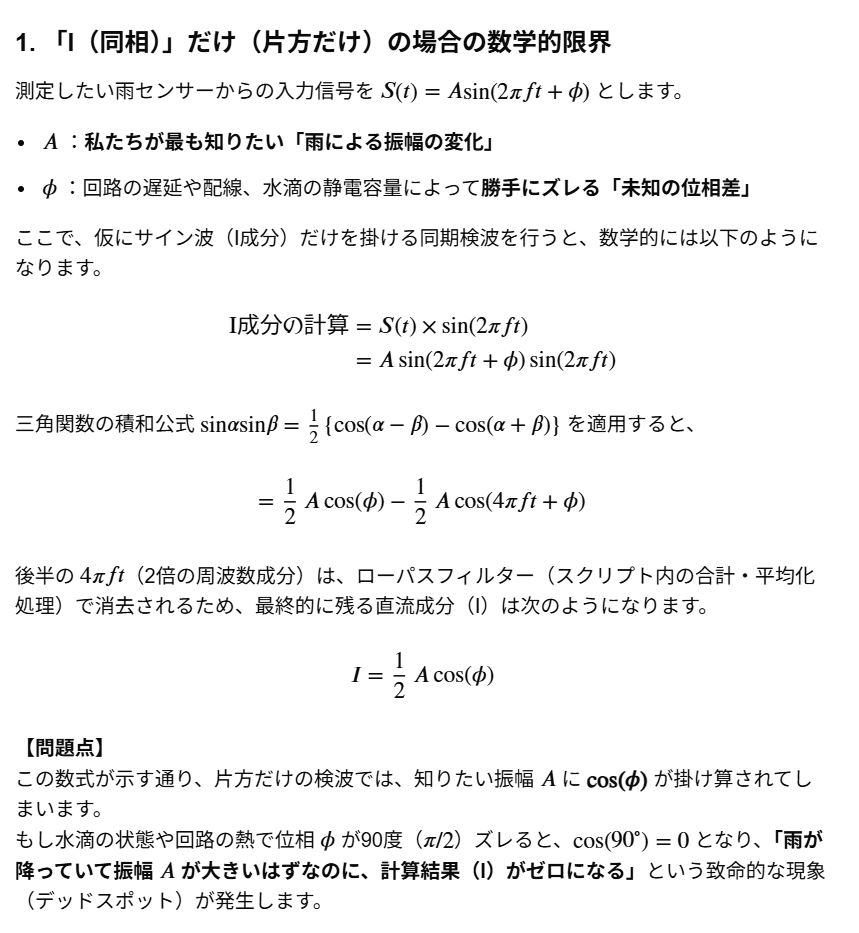
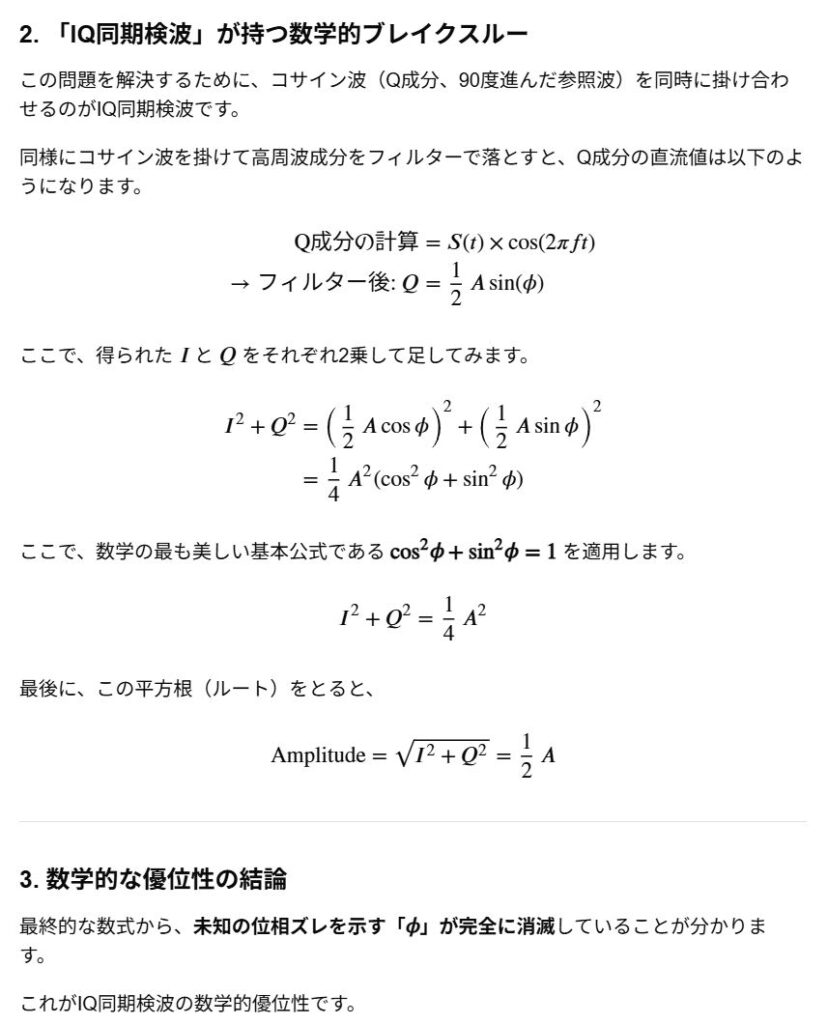
しかし、この方式は原理的に位相の影響を受けないでより正確な結果が期待できる方式である。
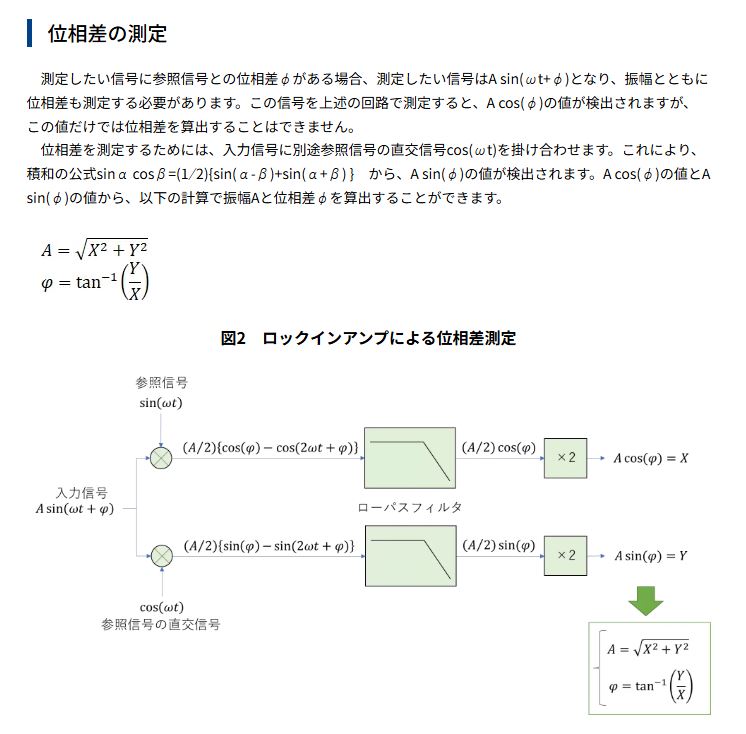
数式的な説明
技術2: ここで使用するDMA ADCの原理
「DMA ADC」とは、CPUを介さずにADC(アナログ・デジタル変換器)のデータを直接メモリ(RAM)に転送する機能です。CPUの処理負荷を抑えながら、高速・連続的なサンプリングを実現します。音声入力や波形測定などに最適です。
なぜDMA ADCが必要なのか?
通常の読み取り(ワンショット)では、CPUが「変換開始」と「値の取得」を毎回制御するため、高いサンプリング周波数を出すとCPUが100%になり、他の処理が止まってしまいます。DMAを利用すれば、設定した速度で自動的に変換とメモリへの転送が行われるため、CPUは転送完了したデータを待機して処理するだけで済みます。
主な特徴とメリット
・高速サンプリング: 通常の読み取りに比べ、非常に高速なサンプリングレート
(数十kHz〜数百kHzに対応)。
・CPU負荷の軽減: DMAコントローラーが自動でデータをメモリに溜めるため、CPUはバックグラウ
ンドで重い処理(FFT解析やデータ保存など)を行えます。
・連続モード(Continuous Mode): 一定の周期で複数のチャンネルを順番にスキャンし続ける用
途(マルチチャンネル・データロギング)に向いています。
実装方法の選択肢
ESP32でDMA ADCを実装する際は、以下の方法やライブラリが利用されます。
1.ESP-IDF(ネイティブAPI)
最も柔軟で、細かな設定が可能です。「ADC Continuous Mode」を使用し、DMAバッファの設定やコールバック関数を定義してデータを取得します。
2.I2Sペリフェラルの流用(オーディオ用途など)
旧来のESP32では、内蔵ADCをI2Sインターフェースの一部として初期化することで、I2SのDMA機能を裏技的に利用するのが標準的な高速化手法でした。現在では専用の連続モードが提供されているため、こちらが推奨されます。
3.Arduino IDE(ESP32ライブラリ)
簡単に扱えるラッパー関数が用意されており、比較的短いコードで高速サンプリングを開始できます。
注意点・デメリット
・Wi-Fi使用時のノイズ: ESP32はWi-Fi/Bluetoothの動作時に電源ラインにノイズが乗りやすい仕様
です。
sensitiveなアナログ信号を高速で読み込む場合、このノイズを拾って波形が乱れることがあります。
・キャリブレーション: ADCの特性上、入力電圧と読み取られたデジタル値に誤差(直線性やオフ
セット)があるため、正確な電圧を知るにはキャリブレーション(校正)値の適用が必要です。
試行錯誤の結果今回は「I2Sペリフェラル方式」を採用しました。
ESP32のI2S(Inter-IC Sound)ペリフェラルは、デジタルオーディオ機器(マイク、DAC、アンプ等)と高品質な音声データを高速転送するためのハードウェア機能です。CPUを介さずにメモリと直接データを送受信できる「DMA」を備えており、高音質な音声処理を効率的に行えます。
今回は音声処理では無いですが、10KHz ADC処理に最適な動作が期待できます。
上記掲載のIQ同期検波スクリプトの流れ解説
1. 初期設定ステージ(setup 内)
プログラムが起動すると、まず裏方となるハードウェアの準備をします。
・10kHzの信号出力:
ledc 機能を使って、GPIO25(PWM_PIN)から10kHzの矩形波(Duty50%)を自動出力させます。
これが雨センサーの駆動源になります。
・超高速サンプリングの仕込み:
ESP32の内蔵ADC(GPIO32)を I2S(オーディオ用通信規格)モード で起動します。
これにより、タイマー割り込みなどの重い処理を使わずに、ハードウェアが自動的に 160kHz(10kHz
の16倍) の超高速でセンサーの電圧をノンストップで測り続けます。
・DMAバッファ(メモリの自動転送):
測ったデータは、CPUの手を借りずに DMA(ダイレクトメモリアクセス) という機能で、自動的
にメモリ上のプール(rx_buffer)へ1024個(BLOCK_SIZE)貯まるごとに一括転送されます。
・Core 0 で専用タスク(DSP_Task)の起動:
Arduinoの通常の処理(loop)とは別の頭脳(Core 0)で、データ計算専用のタスクをバックグラウ
ンドで立ち上げます。
2. データ収集と計算ステージ(DSP_Task 内、Core 0 でループ)
DMAバッファにデータが1024個貯まるたびに、このタスクが目を覚まして一気に計算(デジタル信号処理)を行います。
① 積算(掛け算と足し算)
貯まった1024個のデータに対し、1個ずつ順番に以下の計算を行います。
・そのままの合計 (local_acc_raw): 直流(DC)成分を計算するためにすべて足します。
・サイン成分の合計 (local_acc_sine): データに、あらかじめ用意した10kHzのサイン波の数値(ref_sine)を掛けて足します
・コサイン成分の合計 (local_acc_cosine): 同様に、90度位相がズレたコサイン波(ref_cosine)を
掛けて足します。
② DCオフセット(直流成分)の打ち消し
センサー信号に含まれる「平均電圧(約1.65V)」などの余計な直流成分(DC)が原因で計算エラーが出ないよう、全体の平均値(dc_offset)を算出し、サイン・コサインの合計値から綺麗に差し引きます。
③ 振幅(信号の強さ)の割り出し(直交合成)
・サイン成分(amp_s)とコサイン成分(amp_c)のそれぞれ平均的な強さを出します。
・最後に 三平方の定理を使って1つに合成します。
*ここが最大のポイントです:雨センサーを通ることで信号の波のタイミング(位相)がどれだけ
ズレても、この計算によってズレを完全に無視して「10kHzの純粋な信号の強さ(振幅)」だけを1本
の数値(amplitude)として抽出できます。これがロックインアンプの原理です
④ 安全なデータ受け渡し
計算が終わったら、メインの loop() 側に数値を渡すために shared_amplitude という変数に書き込みます。このとき、書き込み中に別のコアから邪魔されないよう portENTER_CRITICAL(割り込み禁止・ロック)をかけて安全に処理します。
3. 画面出力ステージ(loop 内、Core 1 でループ)
メインの頭脳(Core 1)は、ただひたすら結果を表示するだけの軽い仕事をしています。
・データの受け取り:
Core 0 が計算してくれた最新の振幅データを、ロックをかけながら安全に読み出します
・200ミリ秒(0.2秒)ごとの画面出力: millis() タイマーを使い、0.2秒ごとにシリアルモニターへ raw: [計算された振幅値] を出力します。
・画面出力の合間は delay(1); で一瞬休み、OS(FreeRTOS)の他の処理に道を譲ります。
まとめると
「GPIO25から10kHzの波を送り出し、センサーを通過して戻ってきた波を、I2Sという仕組みで1秒間に16万回超高速サンプリングし、別のコア(Core0)が三平方の定理を使って10kHz以外のノイズを100%シャットアウトした綺麗な振幅データだけを割り出し、0.2秒ごとに画面に出す」という流れを綺麗に自動化しているスクリプトです。
ここで登場する難しい言葉や機能の説明
ESP32のデュアルコアの使い方について
ESP32のデュアルコア(2 Core)機能は、FreeRTOSのタスク作成関数(xTaskCreatePinnedToCore)
を使って使いたい処理を各コアに割り当てるだけで簡単に利用できます。
片方のコアで重い処理、もう片方のコアでセンサー読み取りや通信などを並行して行えます。
コアの役割
ESP32の2つのコアはそれぞれ以下のような特徴があります。
・Core 0 (PRO_CPU): 主にWi-FiやBluetoothなどの無線通信処理が動作します。
・Core 1 (APP_CPU): Arduinoの setup() や loop() が動作します
デュアルコア(マルチタスク)の書き方
// コア0で動かしたい関数
void loop0(void *pvParameters) {
  while(1) {
    // ここにCore 0で行いたい処理を書く
    Serial.println("Core 0 is working...");
    vTaskDelay(1000 / portTICK_PERIOD_MS); // 1秒待機
  }
}

void setup() {
  Serial.begin(115200);

  // Core 0 にタスクを割り当てる
  xTaskCreatePinnedToCore(
    loop0,                // タスクとして実行する関数名
    "Task0",              // タスクの名前(デバッグ用)
    10000,                // スタックサイズ(メモリ量)
    NULL,                 // 関数に渡す引数
    1,                    // 優先度
    NULL,                 // タスクハンドル
    0                     // 割り当てるコア番号(0 または 1)
  );
}

void loop() {
  // ここは自動的に Core 1 で実行されます
  Serial.println("Core 1 is working...");
  delay(1000);
}・Core 0の負荷に注意: Wi-FiやBluetooth通信を行う場合、Core 0はそれらの処理で忙しくなります。
重すぎる処理をCore 0に割り当てると通信が不安定になったり、ウォッチドッグタイマー(WDT)
が作動してリセットされる原因になります。
・変数の共有: グローバル変数を両方のコアで同時に読み書きすると、データが壊れる
(競合状態)可能性があります。必要に応じてセマフォ(Mutex)等での排他制御を検討する。
・Cor 1でのWifi処理
Core 1でWi-Fi処理を行う(コードを書く)ことは可能です。
ただし、ESP32のシステム内部(ESP-IDF)の仕組み上、少し特殊な動きをしています。
1.実際の動作の仕組み
Arduino IDEで WiFi.begin() や HTTPClient などのコードを setup() や loop()(つまりCore 1)
に書いた場合、以下のように処理が分担されます。
・関数の呼び出し(Core 1): Wi-Fi接続やデータ送信の命令は、Core 1から発信されます。
・実際の無線通信・パケット処理(Core 0): 命令を受け取ったESP32のシステム内部(バックグラ
ウンドタスク)が、実際の電波の送受信やネットワーク処理をCore 0で自動的に実行します。
何も意識せずに “Core 1からWi-Fiを操作する” ことができます。
2. Wi-Fiイベントのコールバックに注意
Wi-Fiの接続完了などを検知する WiFi.onEvent() という関数(コールバック)を使用する場合、
その 呼び出し先(イベントハンドラ関数)はデフォルトでCore 0のコンテキストで実行されます。
もしそのコールバック関数の中で重い計算や大きなループ処理を書いてしまうと、Core 0のWi-Fi
シ ステム自体を停止させてしまい、チップが再起動(WDTリセット)する原因になります。
コールバック内はフラグを立てるだけにするなど、極力軽い処理にする必要がある。
推奨される書き方
デュアルコアを活かして安定した通信ガジェットを作る場合、以下の割り当てが最も一般的でト
ラブルが少ないです。
・Core 1 (APP_CPU):loop() をそのまま使い、Wi-Fi通信の制御(データの送受信、Webサーバー
のハンドリングなど)やメインのロジックを行います。
・Core 0 (PRO_CPU):xTaskCreatePinnedToCore で独自のタスクを作り、時間のかかる重い処理
(センサーの連続読み取り、LEDの制御、複雑な計算など)をバックグラウンドで実行させます。
変数の共用 に関して「セマフォ」での排他的処理
セマフォ(Semaphore)とは、コンピュータの並列処理において共有資源へのアクセス数や処理のタイミング(同期)を制御する仕組みです。利用可能な資源の数を示すカウンターを持ち、上限数を超えたアクセスや競合によるデータの破損を防ぎます
具体的なセマフォの使用サンプル
// 共有する変数
int sharedCounter = 0;

// セマフォ(ミューテックス)のハンドル
SemaphoreHandle_t xMutex;

// Core 0 で動かすタスク
void taskCore0(void *pvParameters) {
  while (1) {
    // セマフォの獲得を試みる(最大1000ミリ秒待つ)
    if (xSemaphoreTake(xMutex, pdMS_TO_TICKS(1000)) == pdTRUE) {
      // --- クリティカルセクション(ここから安全に変数を操作) ---
      sharedCounter++;
      Serial.print("[Core 0] Counter incremented to: ");
      Serial.println(sharedCounter);
      // ---------------------------------------------------

      // セマフォを解放する
      xSemaphoreGive(xMutex);
    } else {
      Serial.println("[Core 0] Could not obtain Semaphore");
    }

    vTaskDelay(pdMS_TO_TICKS(1200)); // 1.2秒待機
  }
}

void setup() {
  Serial.begin(115200);

  // ミューテックス型のセマフォを作成
  xMutex = xSemaphoreCreateMutex();

  if (xMutex != NULL) {
    // セマフォの作成に成功したら、Core 0 にタスクを割り当てる
    xTaskCreatePinnedToCore(
      taskCore0,    // タスク関数
      "Task0",      // タスク名
      2048,         // スタックサイズ
      NULL,         // 引数
      1,            // 優先度
      NULL,         // タスクハンドル
      0             // Core 0 を指定
    );
  }
}

void loop() {
  // loop() は自動的に Core 1 で動作します

  // セマフォの獲得を試みる(最大1000ミリ秒待つ)
  if (xSemaphoreTake(xMutex, pdMS_TO_TICKS(1000)) == pdTRUE) {
    // --- クリティカルセクション(ここから安全に変数を操作) ---
    sharedCounter++;
    Serial.print("[Core 1] Counter incremented to: ");
    Serial.println(sharedCounter);
    // ---------------------------------------------------

    // セマフォを解放する
    xSemaphoreGive(xMutex);
  } else {
    Serial.println("[Core 1] Could not obtain Semaphore");
  }

  vTaskDelay(pdMS_TO_TICKS(800)); // 0.8秒待機
}
コードの解説
・xSemaphoreCreateMutex(): データのバッティングを防ぐための「鍵(ミューテックス)」を生成し
ます。
・xSemaphoreTake(): 鍵を取得します。もしもう片方のコアが鍵を持っている(データ処理中)場合
指定した時間(上記では1000ms)まで処理を一時中断して順番を待ちます。
・xSemaphoreGive(): データの書き換えが終わったら鍵を返却します。これを忘れると、もう片方の
コアが永久にデータにアクセスできなくなります(デッドロック)。
同期検波における最適なセマフォの考え方
今回のシステムでは、データの流れが「Core 0(書き込み専用)」→「Core 1(読み取り専用)」と一
方向です。
この場合、先ほどの「お互いに数値を増やしていくサンプル」よりもシンプルな排他制御が可能です。
実際の連携コード例
#include <WiFi.h>
// MQTTやJSONのライブラリは省略しています

// --- 共有データ ---
float iq_amplitude = 0.0; // 検波した振幅情報
SemaphoreHandle_t xMutex;

// --- Core 0: 10kHz 同期検波タスク ---
void taskSignalProcessing(void *pvParameters) {
  while (1) {
    float local_amplitude = 0.0;

    // 1. ここで10kHzの信号処理(IQ同期検波)を高速実行
    // (AD変換、サイン/コサイン乗算、ローパスフィルタなど)
    // local_amplitude = calculated_value;

    // 2. 計算結果を共有変数に書き込む(セマフォで保護)
    if (xSemaphoreTake(xMutex, pdMS_TO_TICKS(5)) == pdTRUE) {
      iq_amplitude = local_amplitude; // 安全に書き込み
      xSemaphoreGive(xMutex);        // すぐに解放
    }

    // 10kHz(100μs周期)の処理を維持するため、ここでの遅延は極小にするか、
    // タイマー割り込み(Timer Interrupt)等と組み合わせるのが一般的です。
    vTaskDelay(pdMS_TO_TICKS(10));
  }
}

void setup() {
  Serial.begin(115200);
  xMutex = xSemaphoreCreateMutex();

  if (xMutex != NULL) {
    xTaskCreatePinnedToCore(
      taskSignalProcessing, "SignalTask", 4096, NULL, 3, NULL, 0
    ); // 信号処理は優先度高め(3)でCore 0へ
  }

  // Wi-FiやMQTTの初期化処理...
}

// --- Core 1: データ処理 & MQTT送信 ---
void loop() {
  float current_amplitude = 0.0;

  // 1. 共有変数から最新の振幅データを読み出す(セマフォで保護)
  if (xSemaphoreTake(xMutex, pdMS_TO_TICKS(10)) == pdTRUE) {
    current_amplitude = iq_amplitude; // 安全に読み出し
    xSemaphoreGive(xMutex);           // すぐに解放
  }

  // 2. 読み出したデータを使って処理・JSON化・MQTT送信
  if (current_amplitude > 0.0) { // 例: 何か検知したら
    String jsonPayload = "{\"amplitude\":" + String(current_amplitude) + "}";
    // mqttClient.publish("rain/sensor", jsonPayload);
    Serial.println("MQTT Sent: " + jsonPayload);
  }

  // MQTT送信やWi-Fi処理の周期(例: 1秒おき)
  vTaskDelay(pdMS_TO_TICKS(1000));
}この仕組みのポイント
・データ衝突の回避(floatの保護)ESP32(32bitマイコン)において、32bit浮動小数点数(float)
の読み書きは基本1サイクルで行われますが、コンパイル結果や最適化によっては、Core 1がデー
タを「読んでいる最中」にCore 0が「書き換える」瞬間がミリ秒未満の確率で発生し得ます。
セマフォはこれによるデータの破損(デグレ)を完全に防ぎます。
・Core 0(検波)の足を引っ張らない工夫Core 1のMQTT送信(Wi-Fi処理)は、ネットワークの状
況に よって一瞬処理が止まる(数十~数百ミリ秒待たされる)ことがあります。
もしセマフォを使わずに直接データをこねくり回していると、Core 0の高速な10kHz検波処理ま
で一緒に巻き添えを食って止まってしまいます。
セマフォを使って「一瞬で変数コピーを終わらせる」ことで、Core 0はCore 1のWi-Fi都合に関
係なく、常に一定のペースで検波を続けられます。
FreeRTOSとは
FreeRTOSとは、マイコン(マイクロコントローラ)などの組み込み機器向けに開発された、オープンソースのリアルタイムOS (RTOS) です。小型軽量で、限られたメモリや処理能力しかないハードウェア上でも効率的に動作する点が大きな特徴です
FreeRTOSの主な特徴
・商用利用も無料:
制約の少ないMITライセンスで提供されており、個人利用はもちろん、商用製品のファームウェア
開発であっても完全に無料で利用できます。
・リアルタイム処理(RTOS):
WindowsやLinuxのように複雑で重い処理を行うのではなく、「決められた時間内に必ず処理を終わ
らせる」ことに特化しています。
・マルチタスク対応:
複数の処理(タスク)を並行して動かせるため、「センサーのデータを読み取りながら、通信を
行い、同時にモーターを制御する」といった複雑な処理を効率よく管理できます。
・高い移植性:
世界中の主要なマイコンアーキテクチャ(Arm、ESP32、STM32など)に移植されており、幅広いハ
ードウェアで動作します。
・AWS(Amazon)との関係現在、FreeRTOSの商標と開発の権利はAmazon Web Services (AWS) が保
有しています。
そのため、基本機能であるリアルタイムカーネルに加え、AWSなどのクラウドサービスと安全に通
信するためのネットワーク機能(Wi-Fi接続、セキュリティ、OTAアップデート機能など)のライブ
ラリも公式に提供されており、IoT機器の開発で非常に高いシェアを誇っています。
ここ迄の結果で分かった今後への指針について
色々実験した見た結果、ESP32では、残念ながら同期検波とWiFiやその他の処理を同時に行うには無
理がある事が判明しました。
もちろん、腕の良い人なら可能かもしれませんが、私には無理でした。
例えば、理想的な10KHzで動作させた場合、同期検波は出来ますが、WiFiを同時に動かすとクラッシュ
してしまいます。
もちろんESP32の特徴である2コアやDMA ADCなどを屈指してもです。
サイン波の周波数を落として1.25KHz程度にして辛うじて動いた時もありましたが、不安定な動作で
動かなくなったりもします、使い物になりませんでした。
色々解決策を探った結果、次の2つの方法を思いつきました。
これ以外にも、外部基準発振器によるサイン波入力式も考えられますが、この方式は同期をとるのに
更に複雑な処理が必要で将来的に挑戦はして見たいですが、現状は保留です。
すぐに私が実現可能な方式
1,時分割方式の採用(何としてもESP32単独でシステム構築する方法)
55秒間同期検波処理、6秒間WiFi処理を時分割で行う方式です。
降雨データーは、なるべくリアルタイムでかつ詳細にほしいので、55秒間のデーターをバッファー
に貯めて置き、6秒のWiFiのモードの時にまとめて送信します、リアルタイム性は失われますが、実
用性としてはまずまずです。(WiFi使用時の6秒程度の測定データーは失われる)
もちろん、NODE-RED側ではまとまったデーターを過去の時間軸に沿って展開してダッシュボード
上に表示させる工夫が必要になります。
測定器としては、うーんという感じで不合格品かも知れませんが、作って見るのは興味深いですね。
面白そうなのと暇なのでやって見ることにしました。
2,2 CPUの採用(ESP32単独仕様はあっさり諦めて実現可能な方策を採る)
弟分のESP-WROOM-02にUARTで送信してWiFi処理を中心に同期分離以外の仕事をさせます。
ESP32はもっぱら同期分離に専念します。
ESP32のやるべき仕事が少なくなったので、扱う波形も矩形波をやめてサイン波、コサイン波のIQ
検波方式で行きます。
部品点数は多くなりますが、リアルタイムに全期間のデーターを処理出来ますので完成度や実用性
は高いと思います。
出来れば兄貴分のESP32で全部やって頂きたいのですが、能力不足で致し方有りません。
という事で次回以降はこの2つの方法について取り組んで行きます。
後編につづく