中国製マニュアル無しブラックボックス風速計の話
元はアマゾンでxuuyuuという販売会社に最初RS485タイプだと思って注文したものが、届いたらタ
イプ違っていて0-10Vタイプが届き,更に研究の為別の4-20mAタイプとパルスタイプを注文したら来たの
は2台共パルスタイプだったという信じがたい事が立て続けに起こりがっかりしておりました。
もちろん返品するという選択肢もあるが、¥4~5,000前後の商品であり返送送料や掛かる時間を考え
ると面倒臭いのでしていない。
そうゆう分けでこの会社には皆様も気を付けて下さい。
色々な種類の風速計が手元に幸か不幸か溜まってしまったので全部作って行くことにした。
パルス式風速計について調べて見た
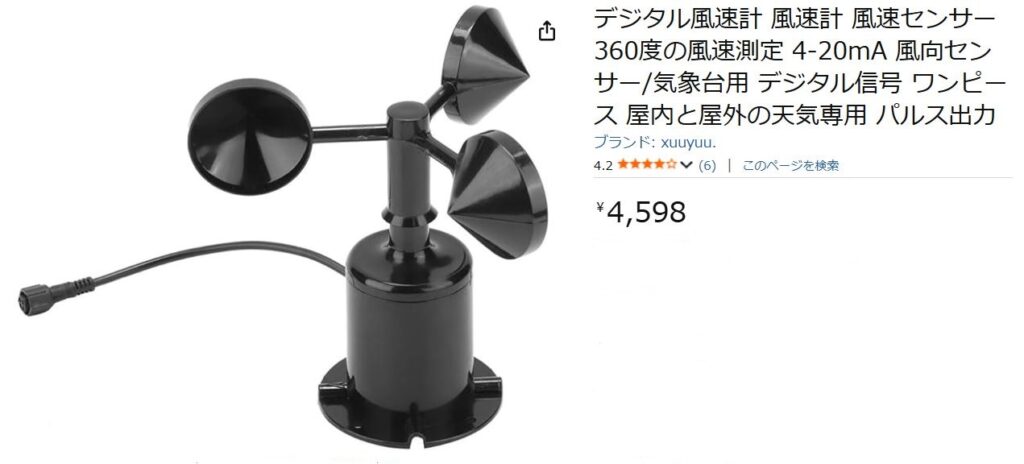
話が違うじゃないの!!!!!!!
あの~末尾にちゃんと「パルス出力」と書いてあります。。。。
ほんまや
という分けで本題に
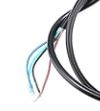
何しろ全く説明書が無いのでどんな仕様なのか外部から調べて行くことになる。
デジタルテスターを使って各ケール間の抵抗値を測ることから始めた。
結果は以下のとうり
黒色 - 茶色間 黒にテスターの黒 茶にテスターの赤 6.91MΩ
黒にテスターの赤 茶にテスターの黒 22.87MΩ
黒色 - 青色間 黒にテスターの黒 青にテスターの赤 O.L
黒にテスターの赤 青にテスターの黒 6.01MΩ
黄色 すべてO.L
これらの商品の通例から黒はGND
茶色は電源(5V-30V) Webの広告に記載有
信号出力は青で黄色は接続無し
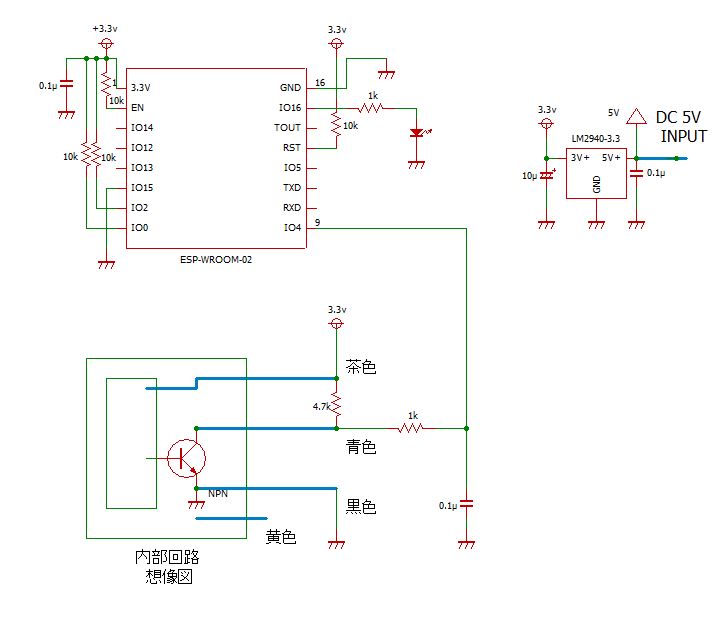
青端子からNPNタイプのオープンコレクターで出力されていることは、本体シールなどから想像出来
るがコレクター抵抗は茶色-青色間の実測抵抗値を見ると付いていないようだ。
本当に1回転20パルス出ているのか?
某国に疑い深い私は、本当に1回転20パルスなのか確認してみた。
パルスをカウントする回路図
パルスをカウントするスクリプト
#include <ESP8266WiFi.h>

// パルスを入力するGPIOピン
const int pulsePin = 4;
volatile unsigned long pulseCount = 0;

// 割り込みサービスルーチン
void ICACHE_RAM_ATTR onPulse() {
  pulseCount++;
}

void setup() {
  Serial.begin(9600);
  pinMode(pulsePin, INPUT_PULLUP);
  attachInterrupt(digitalPinToInterrupt(pulsePin), onPulse, RISING);
}

void loop() {
    Serial.println(pulseCount);
  }
恐らく内部に3.3Vのレギュレーターが入っていると思われ?、3.3Vで入力しても一応動作はするが
危険なので説明書どうり5Vで動かすつもり、とりあえずはテストという事で。
手でゆっくり1回転させながらパルスをカウントして見たが、なかなか無理な様だった。
逆さにしてふっと風速計の裏をみたら3本ねじが見えたので、もしゃ分解できるのでは?
とねじを緩めてみたらあっさり分解できた。
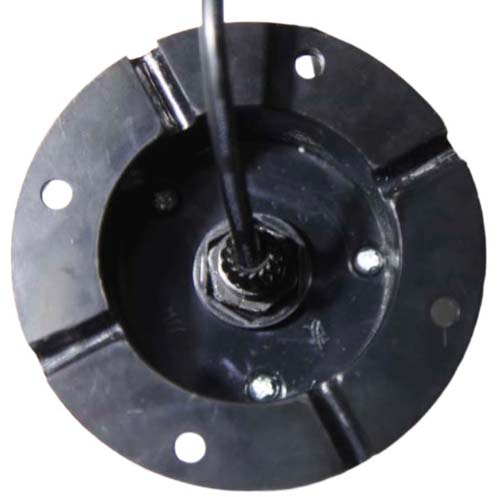
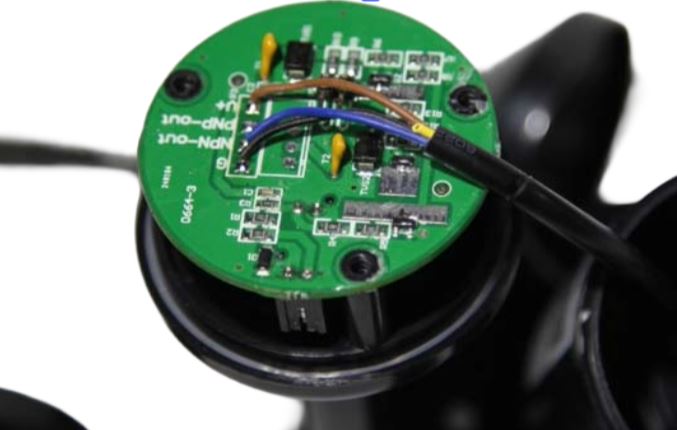
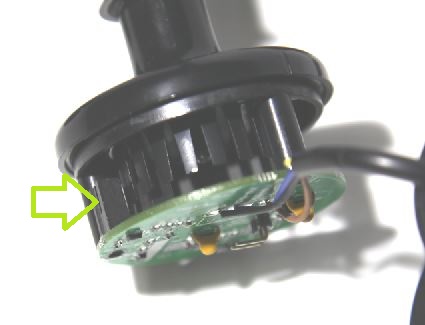
フォトインタラプタ(矢印)
フォトインタラプタの間を回る櫛状の数を数えてみた。
結果確かに20枚あった。
情報によると1回転で20パルス発生し、1回転に要する時間が1秒だった場合、風速は1.75m/s
ということだ。
分解能力、つまり検知能力としては、櫛状のものが1つが1秒間にインタラプタの間隙を動く距離
1.75m/s/20 = 0.0875m/s という事になる。
パルス式 風速計 波形
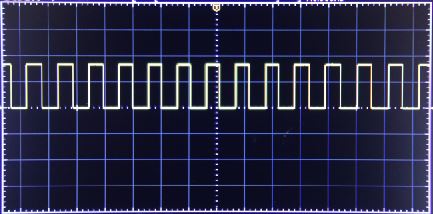
電源電圧 5V
RL=10kΩ
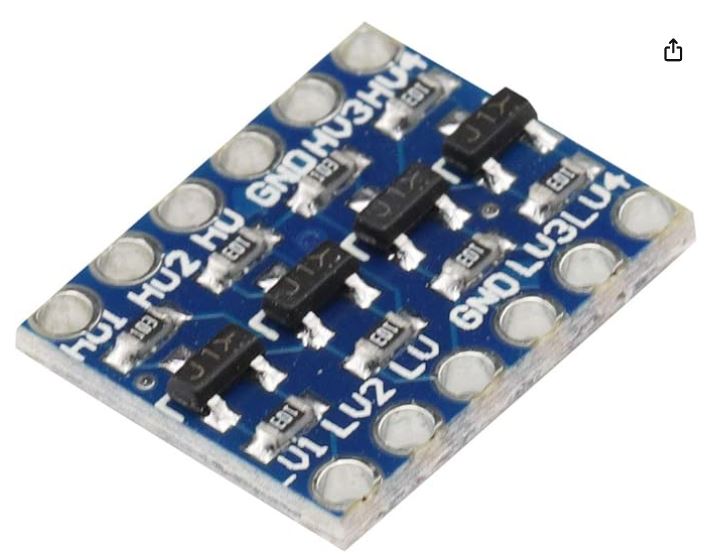
電源電圧を5Vにするとパルスの波高値が4.5V程度になりESP-WROOM-02のポート入力許容電圧を超
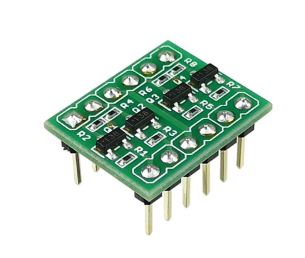
えるので抵抗分圧器や入力する周波数が高い場合には、レベルコンバータモジュールが必要になる。
秋月電子の「 AE-LCNV4-MOSFET(BSS138)」やアマゾンでも入手できる。
入力する周波数が低い場合には、抵抗2本で分圧する安価な方法が使用できる。
以上を調査すべく数値表を作成するPythonスクリプト
# Chinese Pulse Anemometer Spec Table (Extended Version)

WIND_MAX = 70
PULSES_PER_REV = 20
WIND_PER_RPS = 1.75  # 1回転/秒 = 1.75m/s

print(f"{'Wind(m/s)':>10} | {'RPS(回転/秒)':>12} | {'RPM':>10} | {'Pulse/sec':>10}")
print("-" * 55)

for wind in range(0, WIND_MAX + 1):
    rps = wind / WIND_PER_RPS
    rpm = rps * 60
    pulse = rps * PULSES_PER_REV

    print(f"{wind:10.1f} | {rps:12.3f} | {rpm:10.1f} | {pulse:10.3f}")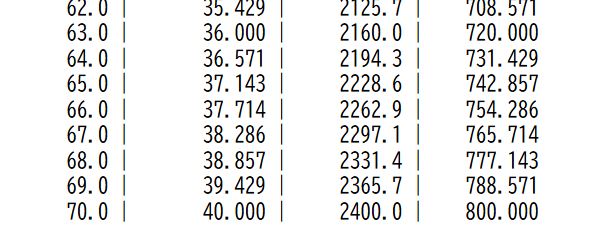
この風速計の最大計測可能な風速は70m/sその時のパルスの周波数は2400Hzなので抵抗分圧器で十分
です。。。
と思ってやってみたらノイズだらけで全く無理でした。
レベルコンバーターもやってみましたが、やはりノイズが多く無理でした。
この種の風速計は海外ユーチューブなどではArduinoで作っている人が多い様でその場合にノイズが
出て使えないという話は聞かないのでPort電圧が5Vタイプならダイレクトなので相性が良いのかも
しれない。
ノイズ対策するのは面倒なので何かいい方法は無いか考えた結果、最終的に3.3Vで動作させること
にした。
理由は3.3Vで動作させるとノイズが無くなるし安定に動作するからです。
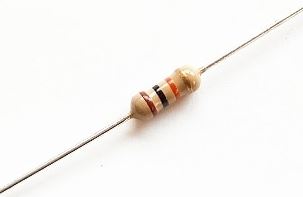
1kΩと0.1uF程度の簡単なフィルターで済みました。
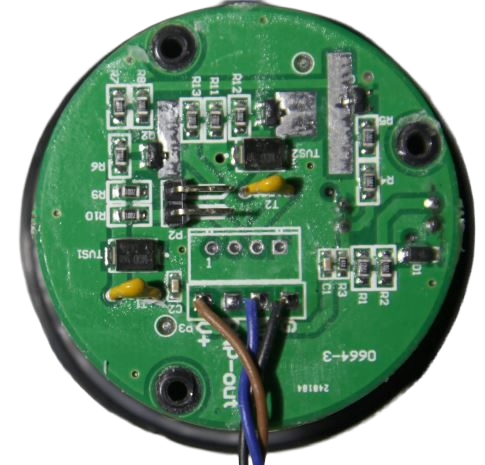
風速計を分解して、基板上の部品を詳細に見てみたが電源用レギュレーターのようなものは見
当たらないしトランジスタ3個とダイオードあとCRL類での構成のようなので特に問題はなさそう?
後日談 ノイズ対策
この機種の信号ラインにはノイズが乗っているのでこのままESP-WROOM-02のポートに入力しても
上手く動作しません。
対策として本体を分解して黒色のGNDケーブルと青色の信号ケーブルの間に0.1uFセラミックコンデン
サを取り付けて下さい。
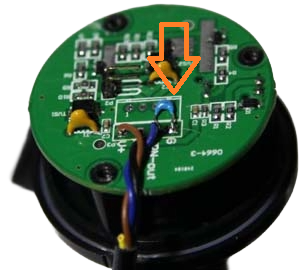
黒色、青色ケーブルの根本(基板上)に0.1uFのセラミックコンデンサを半田付けする
これは効きます、正露丸並みです。
この事は後で気が付いたので、5Vでも動いていた可能性はありますが、面倒なのでこのまま行きます。
という分けで準備が出来ましたのでいよいよ
パルス式風速計最終回路図はパルスをカウントする回路と同じ
風速計内部基板に対策用で取り付けた0.1uFは配線図には記載されていませんので注意して下さい
第一段階テストスクリプト
とりあえずテストスクリプトを実行して見る。
パルスを割り込みで1秒間カウントして周波数を求めてシリアルポートから出力させる
#include <ESP8266WiFi.h>

// パルスを入力するGPIOピン
const int pulsePin = 4;

volatile unsigned long pulseCount = 0;
unsigned long lastMillis = 0;
double frequency = 0;
uint8_t wind_speed = 0;

// 1秒間のパルス数を計測
const unsigned long interval = 1000;

// 割り込みサービスルーチン
void ICACHE_RAM_ATTR onPulse() {
  pulseCount++;
}

void setup() {
  Serial.begin(9600);
  pinMode(pulsePin, INPUT_PULLUP);
  attachInterrupt(digitalPinToInterrupt(pulsePin), onPulse, RISING);
  Serial.println("Frequency Counter Started");
}

void loop() {
  unsigned long currentMillis = millis();

  // 指定インターバル(1秒)ごとに計算
  if (currentMillis - lastMillis >= interval) {

    // 計算中は割り込みを一時的に停止してパルス数を保護
    noInterrupts();
    unsigned long count = pulseCount;
    pulseCount = 0; // カウンタをリセット
    interrupts();   // 割り込みを再開

    // 周波数を計算 (Hz)
    frequency = (double)count * 1000.0 / (currentMillis - lastMillis);

    //周波数から風速 (m/s)に変換
    wind_speed = (int8_t)(frequency * 0.0875);

    // 結果を出力
    //Serial.print("frequency: ");
    //Serial.println(frequency);
    Serial.print("Wind Speed: ");
    Serial.println(wind_speed);

    lastMillis = currentMillis;
  }
}
上記の方法の延長でも風速計としては成り立つが、1秒間のパルス数をカウントしている構造なので
次のような課題点が考えられる。
1,低風速で分解能が悪い
2,微風時0Hzが多くなる
3,分解能が粗い(1Hz単位)
4,応答が遅い
改善策
1,「次のパルスまでの時間(μs)」を測る
周期 = micros() – 前回micros()
周波数 = 1 / 周期で求める
結果のメリット
1,微風でも滑らか
2,0.1Hz以下も検出可能 (無風の時に数値が残る事があるので0.1 0.2 0.3m/s はカットしてあります)
3,応答が速い
以上の点を改良した完成スクリプトが以下 ,データーはMQTTサーバーへ送信している。
パルス式風速計完成スクリプト
#include <ESP8266WiFi.h>
#include <PubSubClient.h>

#define WIFI_SSID "your_ssid"
#define WIFI_PWD  "your_passwd"
const char* mqtt_server = "192.168.1.200";

#define pulsePin 4
#define LED      16

volatile unsigned long lastPulseTime = 0;
volatile unsigned long pulseInterval = 0;
volatile bool newPulse = false;

float wind_speed = 0.0;

WiFiClient espClient;
PubSubClient client(espClient);

// ===== ISR =====
void ICACHE_RAM_ATTR onPulse() {
  unsigned long now = micros();
  pulseInterval = now - lastPulseTime;
  lastPulseTime = now;
  newPulse = true;
}

// ===== MQTT reconnect =====
void reconnect() {
  if (client.connected()) return;

  String clientId = "ESP8266Client-";
  clientId += String(random(0xffff), HEX);

  client.connect(clientId.c_str());
}

void setup() {
  pinMode(pulsePin, INPUT_PULLUP);
  attachInterrupt(digitalPinToInterrupt(pulsePin), onPulse, RISING);

  pinMode(LED, OUTPUT);
  digitalWrite(LED, LOW);

  Serial.begin(115200);

  WiFi.begin(WIFI_SSID, WIFI_PWD);
  while (WiFi.status() != WL_CONNECTED) {
    delay(500);
  }

  client.setServer(mqtt_server, 1883);
  WiFi.config(IPAddress(192, 168, 1, 100), IPAddress(192, 168, 1, 1), IPAddress(255, 255, 255, 0));
}

void loop() {

  if (!client.connected()) reconnect();
  client.loop();

  static unsigned long lastPublish = 0;
  unsigned long nowMillis = millis();

  // 500msごとに更新
  if (nowMillis - lastPublish >= 500) {

    unsigned long intervalCopy;

    noInterrupts();
    intervalCopy = pulseInterval;
    interrupts();

    if (intervalCopy > 0) {

      // 周期(us) → Hz
      float frequency = 1000000.0 / intervalCopy;

      // 風速変換(校正係数)
      wind_speed = frequency * 0.0875;
    if (wind_speed < 0.3) wind_speed = 0;//測定開始 約0.3 m/s

    } else {
      wind_speed = 0.0;
    }

    char msg[12];
    dtostrf(wind_speed, 5, 2, msg);
    client.publish("wind_speed", msg);

    Serial.print("Wind Speed: ");
    Serial.println(msg);


    digitalWrite(LED, !digitalRead(LED));

    lastPublish = nowMillis;
  }
}
NODE-RED
ダッシュボード2
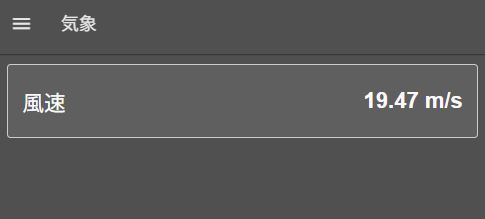
パルス式風力計フロー
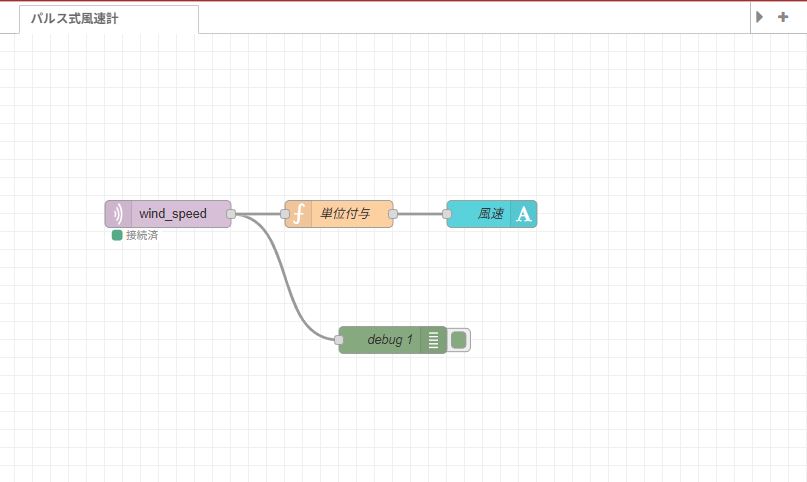
[{"id":"c31a01828a7d6717","type":"tab","label":"フロー 1","disabled":false,"info":"","env":[]},{"id":"74c02f018504dd99","type":"mqtt in","z":"c31a01828a7d6717","name":"","topic":"wind_speed","qos":"2","datatype":"auto-detect","broker":"61e45e3515b67f80","nl":false,"rap":true,"rh":0,"inputs":0,"x":190,"y":200,"wires":[["0f0fe984d5cf198c","32d1e716c05ef4f4"]]},{"id":"32d1e716c05ef4f4","type":"ui-text","z":"c31a01828a7d6717","group":"a2862a7d5d758378","order":1,"width":0,"height":0,"name":"風速","label":"風速","format":"{{msg.payload}}","layout":"row-spread","style":true,"font":"Arial,Arial,Helvetica,sans-serif","fontSize":"24","color":"#fafafa","wrapText":false,"className":"","value":"payload","valueType":"msg","x":410,"y":200,"wires":[]},{"id":"0f0fe984d5cf198c","type":"debug","z":"c31a01828a7d6717","name":"debug 1","active":true,"tosidebar":true,"console":false,"tostatus":false,"complete":"false","statusVal":"","statusType":"auto","x":440,"y":340,"wires":[]},{"id":"61e45e3515b67f80","type":"mqtt-broker","name":"","broker":"192.168.1.200","port":"1883","clientid":"","autoConnect":true,"usetls":false,"protocolVersion":4,"keepalive":60,"cleansession":true,"autoUnsubscribe":true,"birthTopic":"","birthQos":"0","birthRetain":"false","birthPayload":"","birthMsg":{},"closeTopic":"","closeQos":"0","closeRetain":"false","closePayload":"","closeMsg":{},"willTopic":"","willQos":"0","willRetain":"false","willPayload":"","willMsg":{},"userProps":"","sessionExpiry":""},{"id":"a2862a7d5d758378","type":"ui-group","name":"風速","page":"cef20d4917f1c9a7","width":6,"height":1,"order":1,"showTitle":false,"className":"","visible":"true","disabled":"false","groupType":"default"},{"id":"cef20d4917f1c9a7","type":"ui-page","name":"気象","ui":"debf650e7f1343d3","path":"/page1","icon":"home","layout":"grid","theme":"a45c7f2adf09be21","breakpoints":[{"name":"Default","px":"0","cols":"3"},{"name":"Tablet","px":"576","cols":"6"},{"name":"Small Desktop","px":"768","cols":"9"},{"name":"Desktop","px":"1024","cols":"12"}],"order":1,"className":"","visible":"true","disabled":"false"},{"id":"debf650e7f1343d3","type":"ui-base","name":"画面名","path":"/dashboard","appIcon":"","includeClientData":true,"acceptsClientConfig":["ui-notification","ui-control"],"showPathInSidebar":false,"headerContent":"page","navigationStyle":"default","titleBarStyle":"default","showReconnectNotification":true,"notificationDisplayTime":1,"showDisconnectNotification":true,"allowInstall":true},{"id":"a45c7f2adf09be21","type":"ui-theme","name":"気象","colors":{"surface":"#505050","primary":"#505050","bgPage":"#505050","groupBg":"#5f5f5f","groupOutline":"#cccccc"},"sizes":{"density":"default","pagePadding":"12px","groupGap":"12px","groupBorderRadius":"4px","widgetGap":"12px"}},{"id":"f97020142bfa4706","type":"global-config","env":[],"modules":{"@flowfuse/node-red-dashboard":"1.30.2"}}]3秒平均・10分平均・最大瞬間風速+ JSON
更に機能を増やしたタイプ
送信JSON例
{
“inst”: 2.35,
“avg10”: 1.82,
“max”: 5.21,
}
#include <ESP8266WiFi.h>
#include <PubSubClient.h>

#define WIFI_SSID "your_ssid"
#define WIFI_PWD  "your_passwd"
const char* mqtt_server = "192.168.1.200";

#define pulsePin 4

// ===== ISR用 =====
volatile unsigned long lastPulseTime = 0;
volatile unsigned long pulseInterval = 0;

float calibration = 0.0875;  // 校正係数

// ===== 観測バッファ =====
#define BUFFER_SIZE 600  // 10分(600秒)
float windBuffer[BUFFER_SIZE];
int bufferIndex = 0;

WiFiClient espClient;
PubSubClient client(espClient);

// ===== ISR =====
void ICACHE_RAM_ATTR onPulse() {
  unsigned long now = micros();
  pulseInterval = now - lastPulseTime;
  lastPulseTime = now;
}

// ===== MQTT =====
void reconnect() {
  if (client.connected()) return;
  String clientId = "ESP8266-" + String(random(0xffff), HEX);
  client.connect(clientId.c_str());
}

void setup() {
  Serial.begin(115200);

  pinMode(pulsePin, INPUT_PULLUP);
  attachInterrupt(digitalPinToInterrupt(pulsePin), onPulse, RISING);

  WiFi.begin(WIFI_SSID, WIFI_PWD);
  while (WiFi.status() != WL_CONNECTED) delay(500);

  client.setServer(mqtt_server, 1883);
  WiFi.config(IPAddress(192, 168, 1, 100), IPAddress(192, 168, 1, 1), IPAddress(255, 255, 255, 0));

  for (int i = 0; i < BUFFER_SIZE; i++)
    windBuffer[i] = 0;
}

void loop() {

  if (!client.connected()) reconnect();
  client.loop();

  static unsigned long lastSecond = 0;
  unsigned long nowMillis = millis();

  // ===== 1秒ごと処理 =====
  if (nowMillis - lastSecond >= 1000) {

    unsigned long intervalCopy;

    noInterrupts();
    intervalCopy = pulseInterval;
    interrupts();

    float wind_speed = 0;

    if (intervalCopy > 0) {
      float freq = 1000000.0 / intervalCopy;
      wind_speed = freq * calibration;
    }

    // ===== バッファ格納 =====
    windBuffer[bufferIndex] = wind_speed;
    bufferIndex = (bufferIndex + 1) % BUFFER_SIZE;

    // ===== 3秒平均(瞬間風速) =====
    float inst = 0;
    for (int i = 0; i < 3; i++) {
      int idx = (bufferIndex - 1 - i + BUFFER_SIZE) % BUFFER_SIZE;
      inst += windBuffer[idx];
    }
    inst /= 3.0;


    // ===== 10分平均 =====
    float avg10 = 0;
    for (int i = 0; i < BUFFER_SIZE; i++)
      avg10 += windBuffer[i];
    avg10 /= BUFFER_SIZE;

    // ===== 10分最大瞬間 =====
    float maxGust = 0;
    for (int i = 0; i < BUFFER_SIZE; i++)
      if (windBuffer[i] > maxGust)
        maxGust = windBuffer[i];

    // ===== MQTT送信 =====count +=1;

        char msg[50];
        snprintf(msg, sizeof(msg),
             "{\"inst\":%.2f,\"avg10\":%.2f,\"max\":%.2f}",
             inst, avg10, maxGust);

        client.publish("wind_speed", msg);
        Serial.println(msg);


    lastSecond = nowMillis;
  }
}
NODE-REDフロー
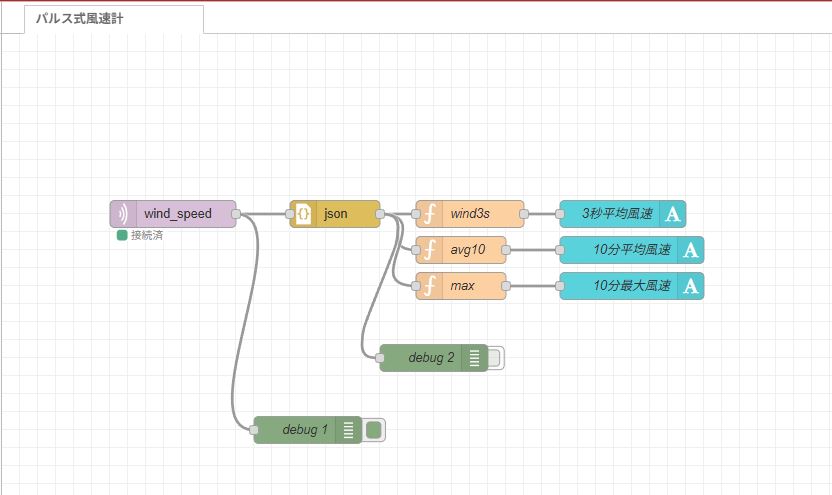
[{"id":"c31a01828a7d6717","type":"tab","label":"パルス式風速計","disabled":false,"info":"","env":[]},{"id":"74c02f018504dd99","type":"mqtt in","z":"c31a01828a7d6717","name":"","topic":"wind_speed","qos":"2","datatype":"auto-detect","broker":"61e45e3515b67f80","nl":false,"rap":true,"rh":0,"inputs":0,"x":190,"y":200,"wires":[["ac1a366d1ac2439e","0f0fe984d5cf198c"]]},{"id":"ac1a366d1ac2439e","type":"json","z":"c31a01828a7d6717","name":"","property":"payload","action":"obj","pretty":false,"x":370,"y":200,"wires":[["66da9ef6123e54c9","2f641fe696a56153","0dbc4eba2af4d55b","5f9e09662e85ddd7"]]},{"id":"66da9ef6123e54c9","type":"function","z":"c31a01828a7d6717","name":"wind3s","func":"var temp = msg.payload.inst;\nmsg.payload = temp + \" m/s\";\nreturn msg;\n\n","outputs":1,"timeout":0,"noerr":0,"initialize":"","finalize":"","libs":[],"x":520,"y":200,"wires":[["32d1e716c05ef4f4"]]},{"id":"2f641fe696a56153","type":"function","z":"c31a01828a7d6717","name":"avg10","func":"var temp = msg.payload.avg10;\nmsg.payload = temp + \" m/s\";\nreturn msg;","outputs":1,"timeout":0,"noerr":0,"initialize":"","finalize":"","libs":[],"x":510,"y":240,"wires":[["e1861955adadd532"]]},{"id":"0dbc4eba2af4d55b","type":"function","z":"c31a01828a7d6717","name":"max","func":"var temp = msg.payload.max;\nmsg.payload = temp + \" m/s\";\nreturn msg;\n","outputs":1,"timeout":0,"noerr":0,"initialize":"","finalize":"","libs":[],"x":510,"y":280,"wires":[["abefaff50b0c8deb"]]},{"id":"32d1e716c05ef4f4","type":"ui-text","z":"c31a01828a7d6717","group":"a2862a7d5d758378","order":1,"width":0,"height":0,"name":"3秒平均風速","label":"3秒平均風速","format":"{{msg.payload}}","layout":"row-center","style":true,"font":"Arial,Arial,Helvetica,sans-serif","fontSize":"24","color":"#fafafa","wrapText":false,"className":"","value":"payload","valueType":"msg","x":690,"y":200,"wires":[]},{"id":"e1861955adadd532","type":"ui-text","z":"c31a01828a7d6717","group":"a2862a7d5d758378","order":2,"width":0,"height":0,"name":"10分平均風速","label":"10分平均風速","format":"{{msg.payload}}","layout":"row-center","style":true,"font":"Arial,Arial,Helvetica,sans-serif","fontSize":"24","color":"#fafafa","wrapText":false,"className":"","value":"payload","valueType":"msg","x":700,"y":240,"wires":[]},{"id":"abefaff50b0c8deb","type":"ui-text","z":"c31a01828a7d6717","group":"a2862a7d5d758378","order":3,"width":0,"height":0,"name":"10分最大風速","label":"10分最大風速","format":"{{msg.payload}}","layout":"row-center","style":true,"font":"Arial,Arial,Helvetica,sans-serif","fontSize":"24","color":"#fafafa","wrapText":false,"className":"","value":"payload","valueType":"msg","x":700,"y":280,"wires":[]},{"id":"0f0fe984d5cf198c","type":"debug","z":"c31a01828a7d6717","name":"debug 1","active":true,"tosidebar":true,"console":false,"tostatus":false,"complete":"false","statusVal":"","statusType":"auto","x":340,"y":440,"wires":[]},{"id":"5f9e09662e85ddd7","type":"debug","z":"c31a01828a7d6717","name":"debug 2","active":false,"tosidebar":true,"console":false,"tostatus":false,"complete":"false","statusVal":"","statusType":"auto","x":480,"y":360,"wires":[]},{"id":"61e45e3515b67f80","type":"mqtt-broker","name":"","broker":"192.168.1.200","port":"1883","clientid":"","autoConnect":true,"usetls":false,"protocolVersion":4,"keepalive":60,"cleansession":true,"autoUnsubscribe":true,"birthTopic":"","birthQos":"0","birthRetain":"false","birthPayload":"","birthMsg":{},"closeTopic":"","closeQos":"0","closeRetain":"false","closePayload":"","closeMsg":{},"willTopic":"","willQos":"0","willRetain":"false","willPayload":"","willMsg":{},"userProps":"","sessionExpiry":""},{"id":"a2862a7d5d758378","type":"ui-group","name":"風速","page":"cef20d4917f1c9a7","width":6,"height":1,"order":1,"showTitle":false,"className":"","visible":"true","disabled":"false","groupType":"default"},{"id":"cef20d4917f1c9a7","type":"ui-page","name":"気象","ui":"debf650e7f1343d3","path":"/page1","icon":"home","layout":"grid","theme":"a45c7f2adf09be21","breakpoints":[{"name":"Default","px":"0","cols":"3"},{"name":"Tablet","px":"576","cols":"6"},{"name":"Small Desktop","px":"768","cols":"9"},{"name":"Desktop","px":"1024","cols":"12"}],"order":1,"className":"","visible":"true","disabled":"false"},{"id":"debf650e7f1343d3","type":"ui-base","name":"画面名","path":"/dashboard","appIcon":"","includeClientData":true,"acceptsClientConfig":["ui-notification","ui-control"],"showPathInSidebar":false,"headerContent":"page","navigationStyle":"default","titleBarStyle":"default","showReconnectNotification":true,"notificationDisplayTime":1,"showDisconnectNotification":true,"allowInstall":true},{"id":"a45c7f2adf09be21","type":"ui-theme","name":"気象","colors":{"surface":"#505050","primary":"#505050","bgPage":"#505050","groupBg":"#5f5f5f","groupOutline":"#cccccc"},"sizes":{"density":"default","pagePadding":"12px","groupGap":"12px","groupBorderRadius":"4px","widgetGap":"12px"}},{"id":"c46003c3f93ed961","type":"global-config","env":[],"modules":{"@flowfuse/node-red-dashboard":"1.30.2"}}]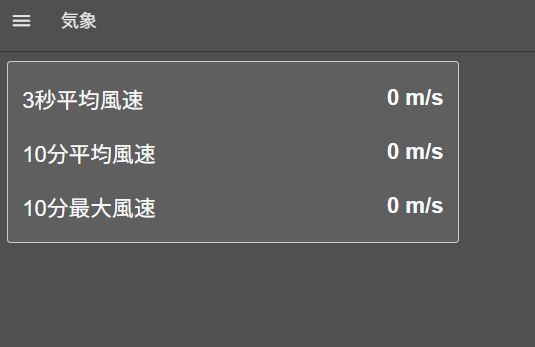
組み立て
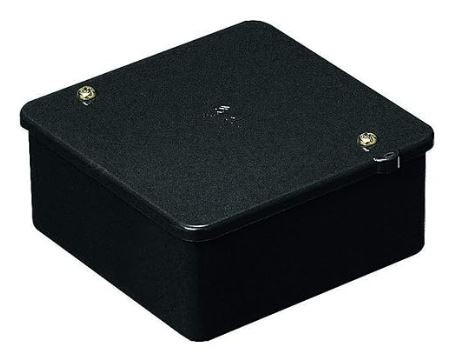
PVK-BOK 購入先 アマゾン ¥703
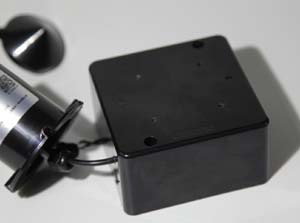
後ろ面にケーブル用の穴2箇所開ける
前面にLED用の穴あける
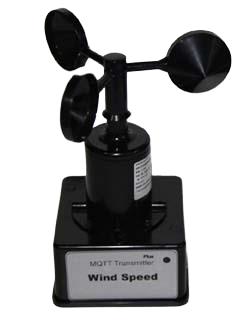
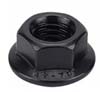
未来工業のケースを使用します。
防水とは言ってないですが、特に問題は無いでしょう。
上部のねじ穴はパテで塞ぎます。
逆さにしたので底部をシリコンなどで塞ぎます。
風速計からのケーブルは、最短でカット接続します、引っ張りまわすとノイズが乗ります。
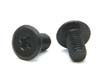
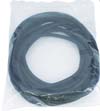
天板の風速計固定ねじはM4x10mm x4本 後部ケーブル穴は風速計用5mmφ 電源ケーブル用は
内径7.4mmのコルゲートチューブが入るサイズに。
前面LED穴は3mmφ
屋外設置固定は「ネオジム磁石」を利用すると便利です。
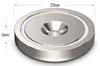
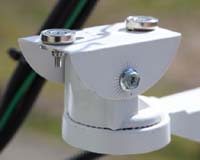
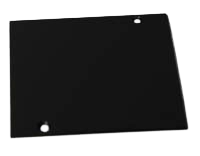
購入先 横山テクノ 購入価格 ¥370
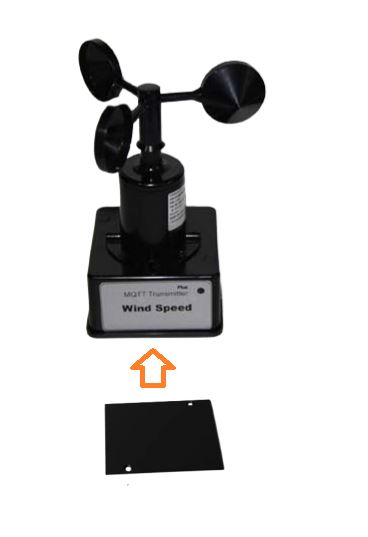
皿ねじで固定する
完成品と運用の様子
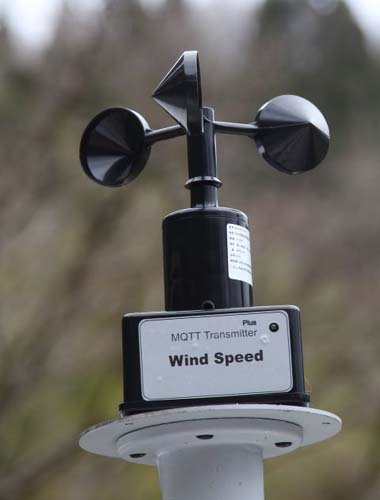
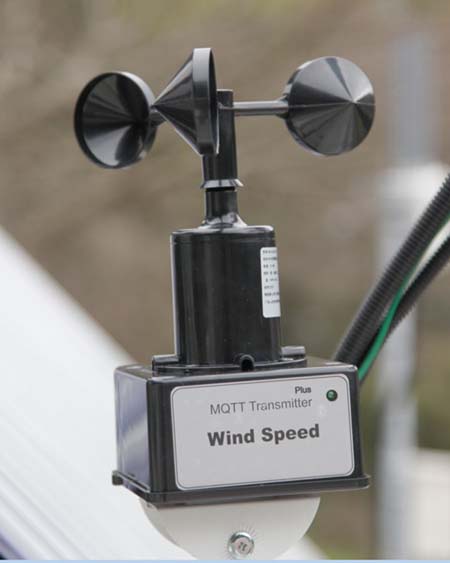
以上で完成したが、果たして広告に書いてあるスペック
「解像度0.0875m/s;精度±0./s;測定範囲0-70m/s;動的応答時間0.5秒」
の性能が出ているかどうかは不明なままだ。(精度±0./sは恐らくミスプリントだろう)
風洞実験は無理としても、せめて有名メーカーの校正証明書付の風速計と比較してみる位はやる必要はありそう。